Big Data and Cloud Computing
Résumé de section
-
-
-
-
-
In this course, we will focus on three main chapters : the first is an introduction to Big Data,
the second is the Big Data Storage Concepts, and the third is the Big Datat Processing
Concepts (see the mind map).
In this lecture, we will cover only the first two chapters.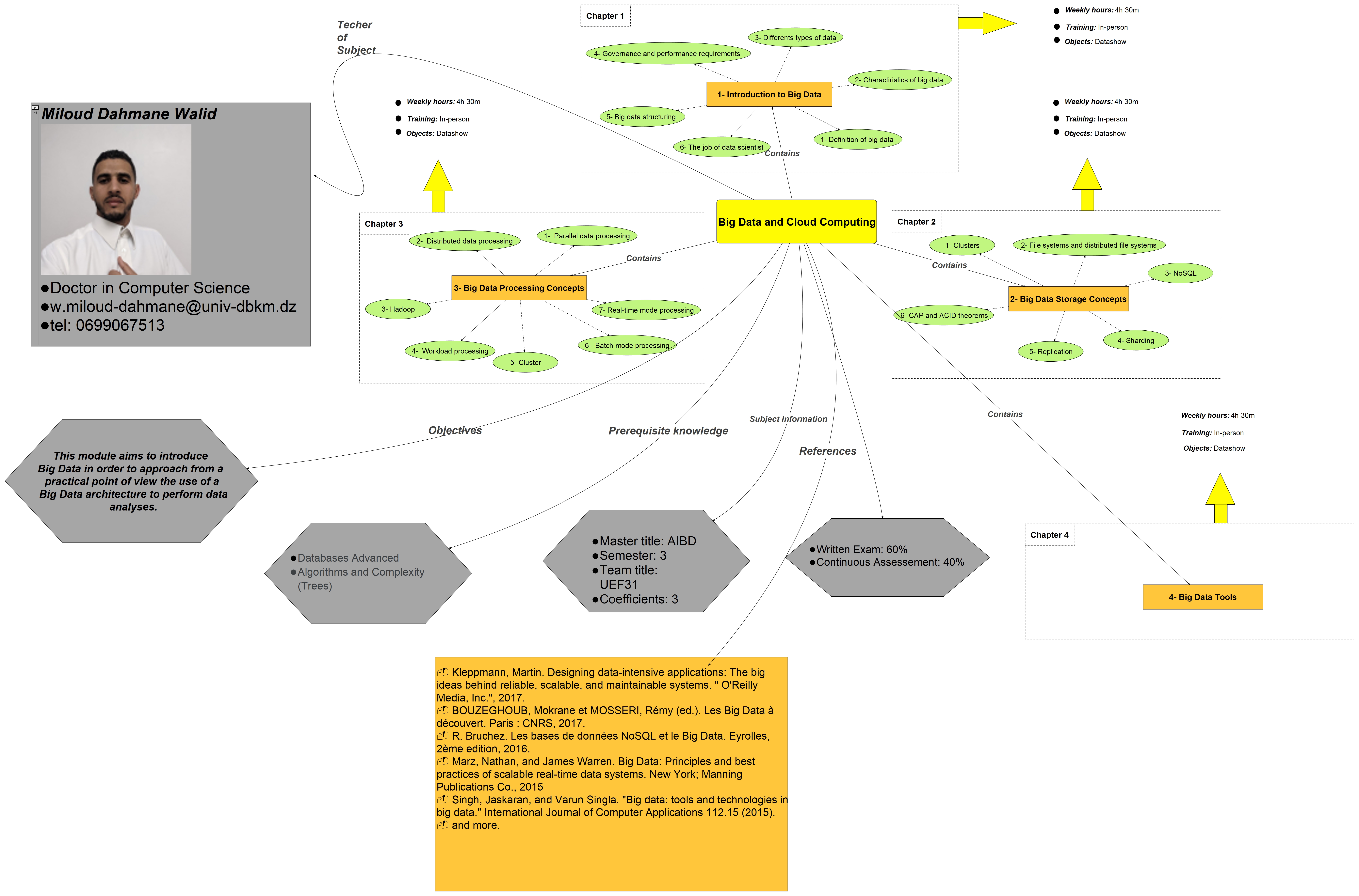
-
-
-
-
-
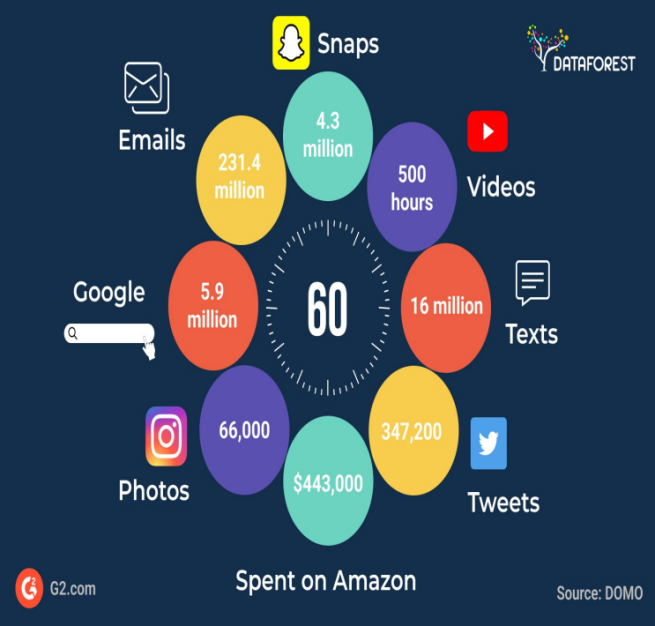
Big Data refers to extremely large datasets that are complex and difficult to manage, process, or analyze using traditional data management tools.
-
-
-
-
-
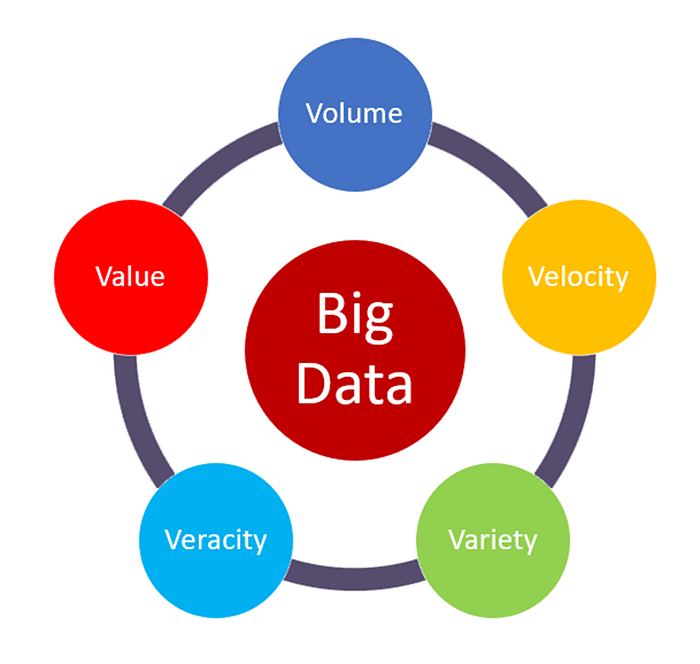
The "volume" in Big Data refers to the enormous amount of data generated every second. It’s one of the key characteristics of Big Data and highlights the sheer size of the data being collected and stored.
The size can range from terabytes (TB) to petabytes (PB) and even more.
The "velocity" in Big Data refers to the speed at which data is generated, processed, and analyzed. It highlights how quickly data flows into systems and the need to handle this fast-moving data in real time or near real time.
The "variety" in Big Data refers to the different types and formats of data that are collected from multiple sources. It highlights how Big Data includes both structured and unstructured information.
Key Types of Data:
- Structured Data
- Unstructured Data
- Semi-Structured Data
The "veracity" in big data refers to the quality, accuracy, and trustworthiness of the data being analyzed. It highlights the challenges posed by uncertainty, inconsistencies, and biases in data.
Big data often comes from multiple sources, like social media, sensors, and logs, which may contain errors, noise, or conflicting information.
How It's Managed :
- Data Cleaning
- Validation
- Algorithms
The "value" in Big Data refers to the usefulness or insights that can be extracted from data. It emphasizes that data is only meaningful if it can provide actionable benefits to businesses, organizations, or individuals.
Not All Data is Useful: Just collecting large amounts of data is not enough. The value comes from analyzing and using it effectively.
Business Impact: Big Data helps businesses make better decisions, improve customer experiences, and reduce costs.
-
-
-
-
-
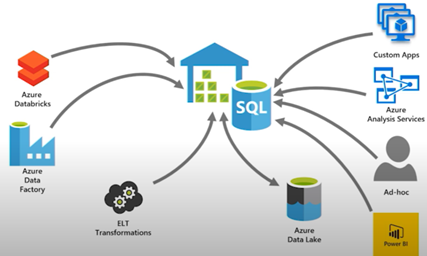
A data warehouse is a centralized repository designed specifically for storing and
managing structured data. It is optimized for querying and analyzing large datasets,
making it essential for business intelligence (BI) and decision-making processes.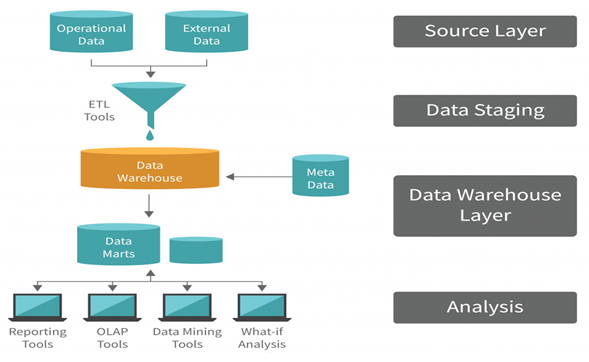
- Source Layer: This layer includes the operational data (such as transactional databases) and external data (e.g., third-party data, web data, etc.).
Collects raw data from multiple sources, which may have different formats, structures, or storage systems. - Data Staging: Data from the source layer is Extracted, Transformed, and Loaded (ETL process) into this staging area.
Handles data transformation, such as converting data types, handling missing values, or merging datasets. - Data Warehouse Layer: This is the central repository that stores the processed data in a structured format.
Allows querying large datasets efficiently.
Metadata: Provides information about the data, such as schema, relationships, and lineage.
Data Marts: Smaller subsets of the data warehouse focused on specific business domains, like sales or finance. - Analysis Layer: This layer is where users interact with the data warehouse to extract insights.
Provides tools and applications for analysis, reporting, and visualization.
- Source Layer: This layer includes the operational data (such as transactional databases) and external data (e.g., third-party data, web data, etc.).
-
A data lake is a centralized repository that stores large volumes of raw, unprocessed data in its native format, whether structured, semi-structured, or unstructured. It enables organizations to collect, manage, and process diverse datasets at scale, supporting a wide variety of use cases such as analytics, machine learning, and real-time processing.
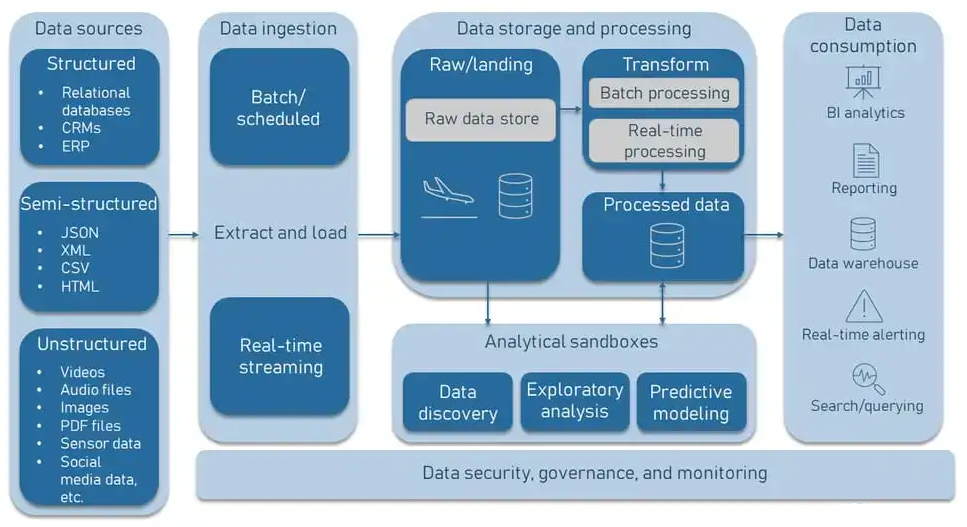
- Data Ingestion:
Data is gathered from multiple sources, including databases, streaming platforms, IoT devices, and APIs.
Tools like Apache Kafka, Flume, or AWS Glue facilitate ingestion.
- Data Storage:
Raw data is stored in its native format (e.g., CSV, JSON, images, or videos).
Common storage solutions include Amazon S3, Azure Data Lake, or Hadoop Distributed File System (HDFS).
- Data Processing:
Tools like Apache Spark or MapReduce process raw data for specific use cases.
Processing can be batch-oriented or real-time depending on the requirements.
- Data Analytics and Machine Learning:
Analysts and data scientists use tools like TensorFlow, PyTorch, or BI tools (Power BI, Tableau) to analyze data or build predictive models.
- Data Ingestion:
-
-
-
-
-
A cluster is a tightly coupled collection of servers, or nodes.
They servers usually have the same hardware specifications and are connected together
via a network to work as a single unit.
Each node in the cluster has its own dedicated resources, such as memory, a processor,
and a hard drive.
A cluster can execute a task by splitting it into small pieces and distributing their
execution onto different computers that belong to the cluster.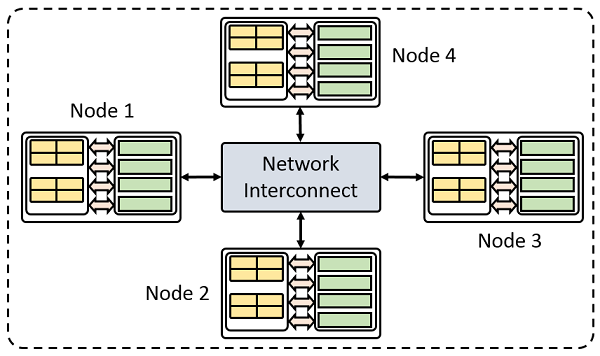
-
-
-
-
-
-
-
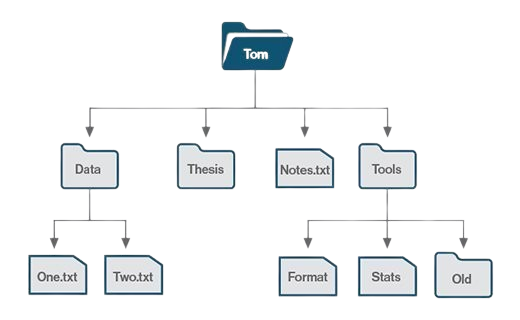
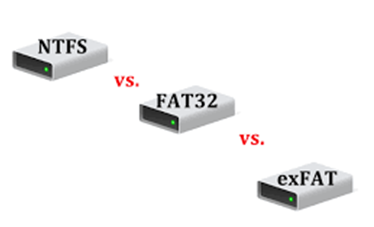
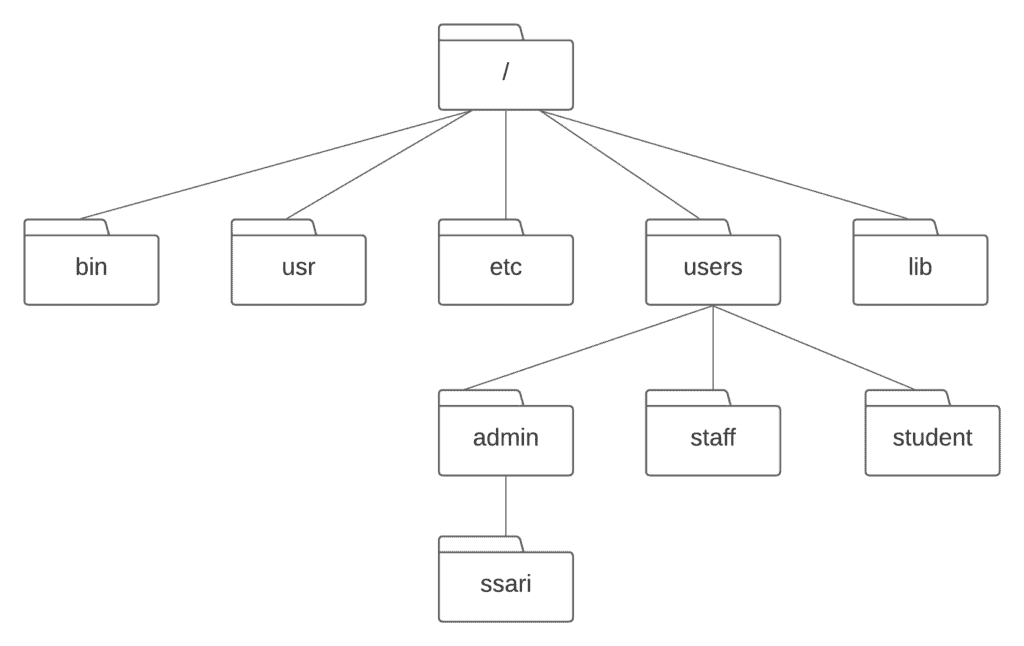
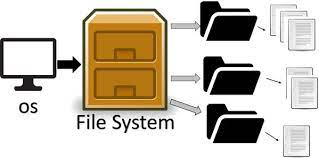
A file system provides a logical view of the data stored on the storage device and presents it as a tree structure of directories and files.
Operating systems employ file systems to store and retrieve data on behalf of applications.
-
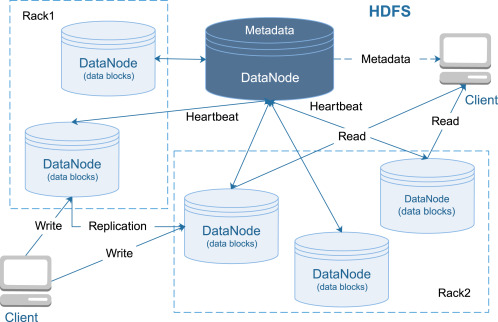
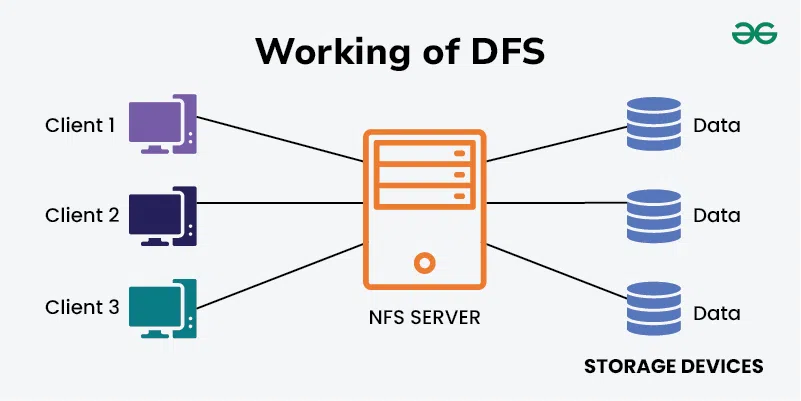
A distributed file system is a file system that can store large files spread across the nodes of a cluster.
To the client, files appear to be local; however, this is only a logical view.
Physically, the files are distributed throughout the cluster.
This local view is presented via the distributed file system and it enables the files to be accessed from multiple locations.
Examples include the Google File System (GFS) and Hadoop Distributed File System (HDFS).
-
-
-
-
-
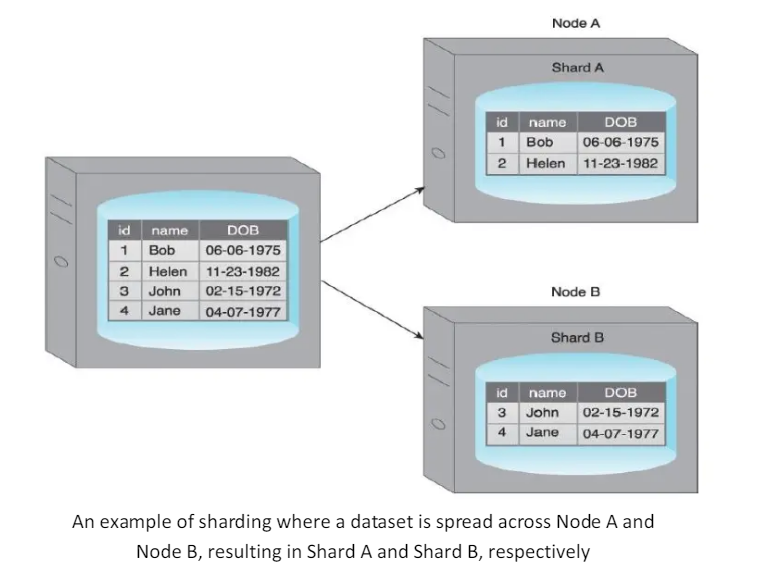
Sharding is the process of horizontally partitioning a large dataset into a collection of smaller, more manageable datasets called shards.
The shards are distributed across multiple nodes, where a node is a server or a machine.
Each shard
- It is stored on a separate node and each node 1s responsible for only the data stored on it.
- It shares the same schema, and all shards collectively represent the complete dataset.
-
-
-
-
-
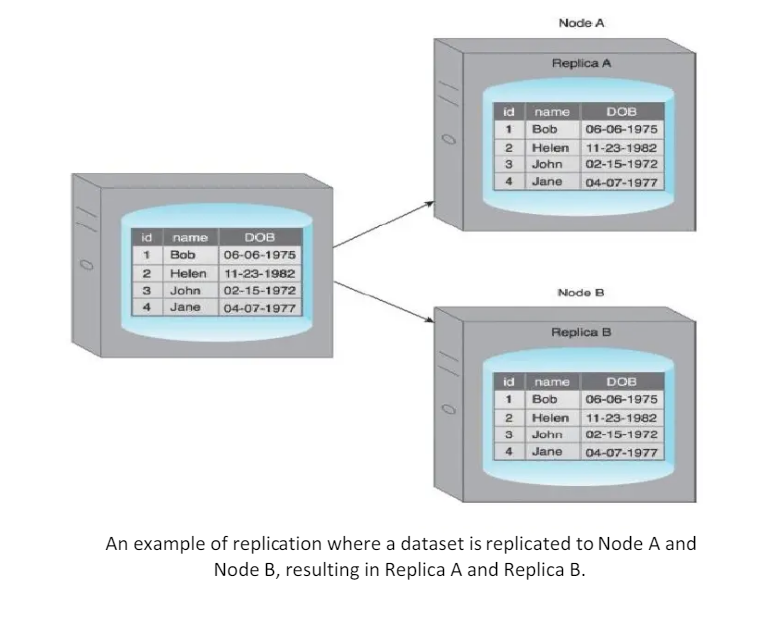
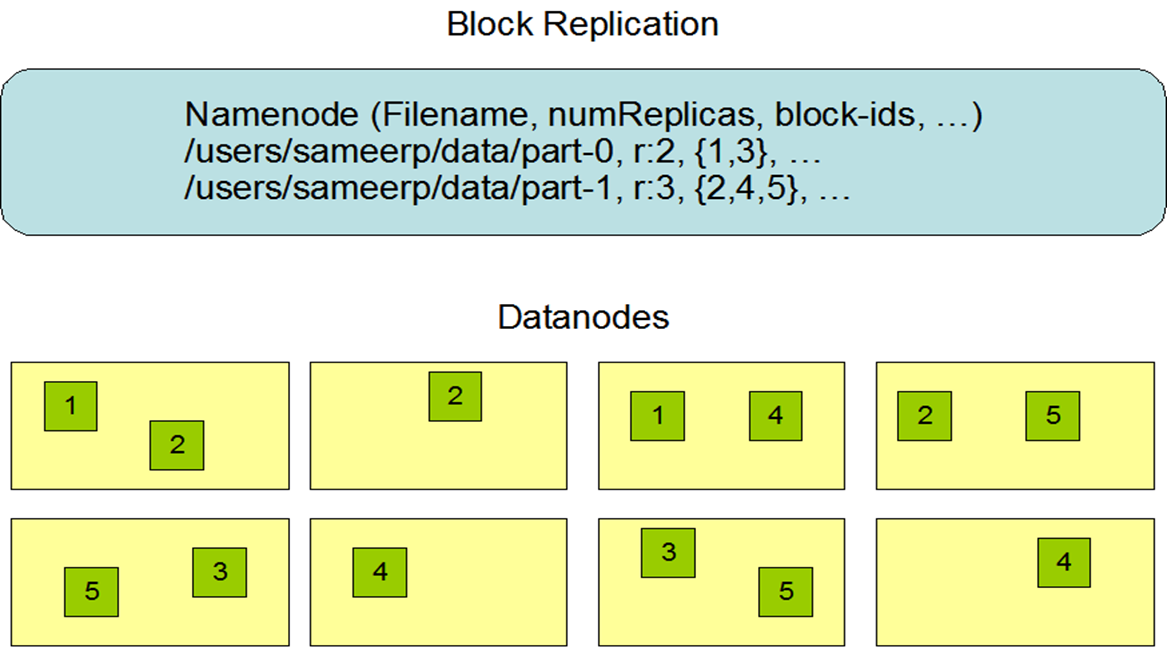
Replication stores multiple copies of a dataset, known as replicas, on multiple nodes.
Replication provides scalability and availability due to the fact that the same data is replicated on various nodes.
Fault tolerance is also achieved since data redundancy ensures that data is not lost when an individual node fails.
There are two different methods that are used to implement replication:
- master-slave
- peer-to-peer
-
Nodes are arranged in a master-slave configuration, and all data is written to a master node.
Once saved, the data 1s replicated over to multiple slave nodes.
All external write requests, including insert, update and delete, occur on the master node, whereas read requests can be fulfilled by any slave node.
It is ideal for read intensive loads rather than write intensive loads since growing read demands can be managed by horizontal scaling to add more slave nodes.
Writes are consistent, as all writes are coordinated by the master node.
Write performance will suffer as the amount of writes increases.
If the master node fails, reads are still possible via any of the slave nodes.
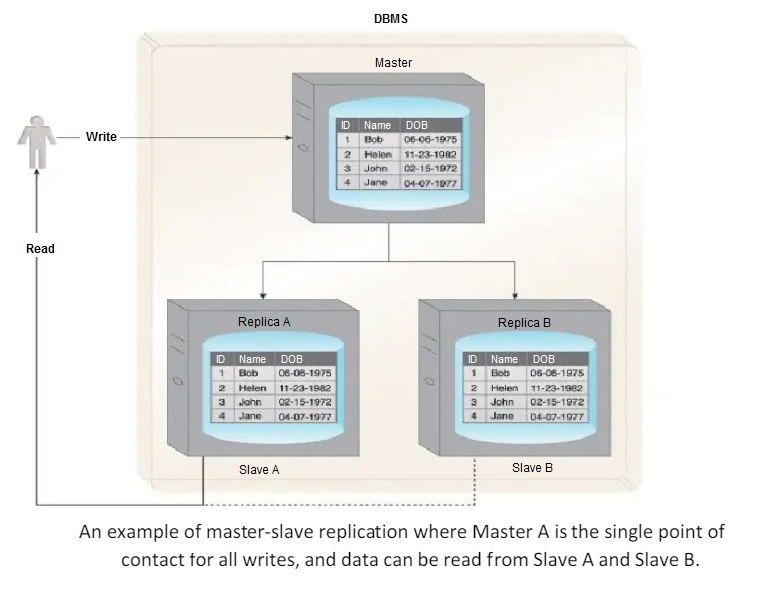
A slave node can be configured as a backup node for the master node.
Read inconsistency, which can be an issue if a slave node is read prior to an update to the master being copied to it.
To ensure read consistency, a voting system can be implemented where a read is declared consistent if the majority of the slaves contain the same version of the record.
Implementation of such a voting system requires a reliable and fast communication mechanism between the slaves.
- User A updates data.
- The data is copied over to Slave A by the Master.
- Before the data is copied over to Slave B, User B tries to read the data from Slave B, which results in an inconsistent read.
- The data will eventually become consistent when Slave B is updated by the Master.
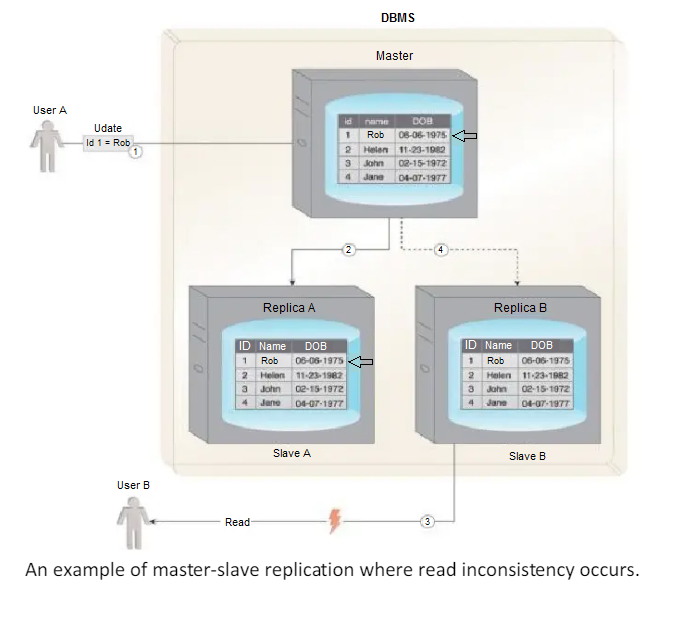
-
With peer-to-peer replication, all nodes operate at the same level.
In other words, there is not a master-slave relationship between the nodes.
Each node, known as a peer, is equally capable of handling reads and writes.
Each write is copied to all peers.
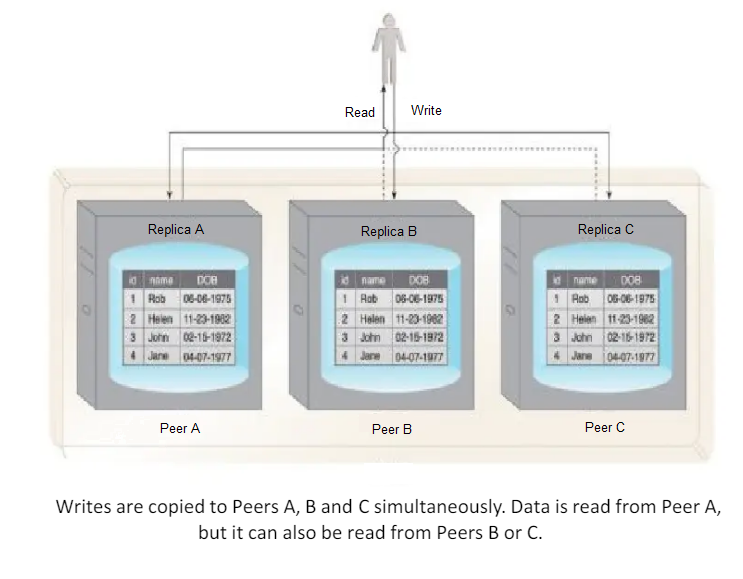
Peer-to-peer replication is prone to write inconsistencies that occur as a result of a simultaneous update of the same data across multiple peers.
This can be addressed by implementing either a pessimistic or optimistic concurrency strategy.
- Pessimistic concurrency is a proactive strategy that prevents inconsistency.
- It uses locking to ensure that only one update to a record can occur at a time. However, this is detrimental to availability since the database record being updated remains unavailable until all locks are released.
- Optimistic concurrency is a reactive strategy that does not use locking.
Instead, it allows inconsistency to occur with knowledge that eventually consistency will be achieved after all updates have propagated.
With optimistic concurrency, peers may remain inconsistent for some period of time before attaining consistency. However, the database remains available as no locking is involved.
Reads can be inconsistent during the time period when some of the peers have completed their updates while others perform their updates.
However, reads eventually become consistent when the updates have been executed on all peers.
To ensure read consistency, a voting system can be implemented where a read 1s declared consistent if the majority of the peers contain the same version of the record.
As previously indicated, implementation of such a voting system requires a reliable and fast communication mechanism between the peers.
Demonstrates a scenario where an inconsistent read occurs.
- User A updates data.
-
2.1. The data is copied over to Peer A.
2.2. The data is copied over to Peer B. - Before the data is copied over to Peer C, User B tries to read the data from Peer C, resulting in an inconsistent read.
- The data will eventually be updated on Peer C, and the database will once again become consistent.
-
To improve on the limited fault tolerance offered by sharding, while additionally benefiting from the increased availability and scalability of replication, both sharding and replication can be combined.
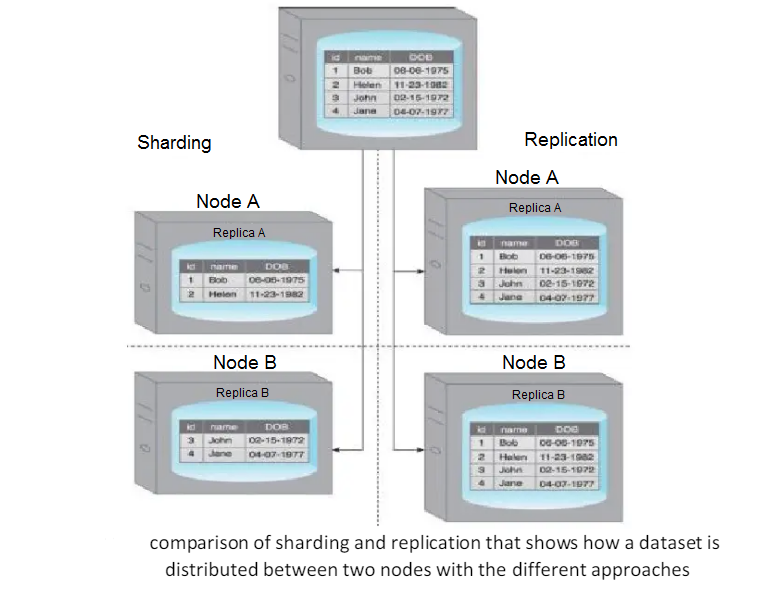
-
-
-
-
-
-
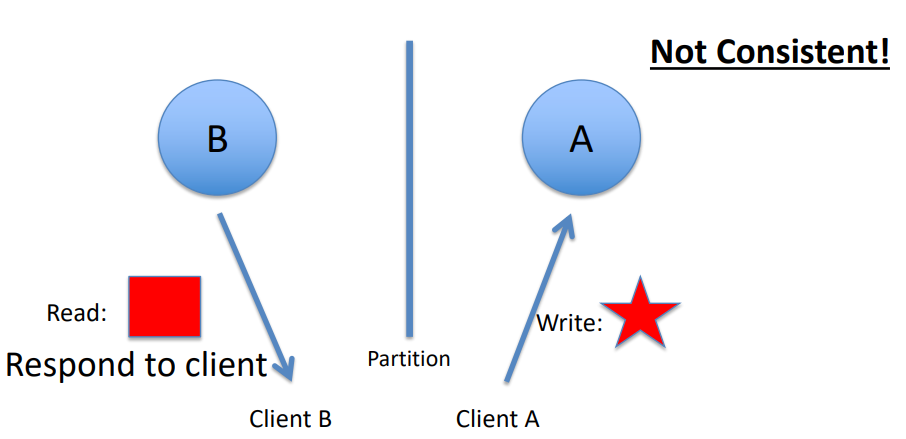
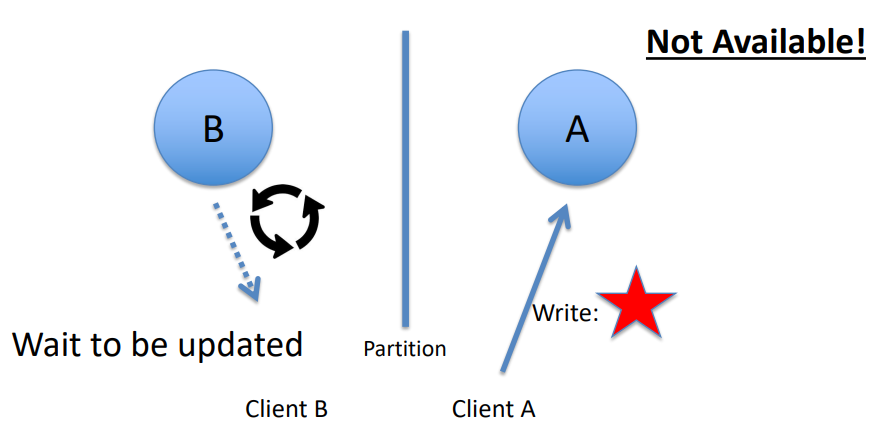
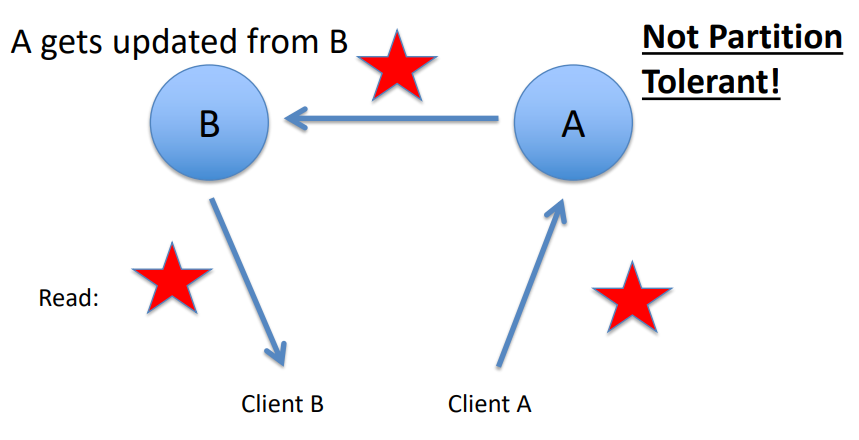
-
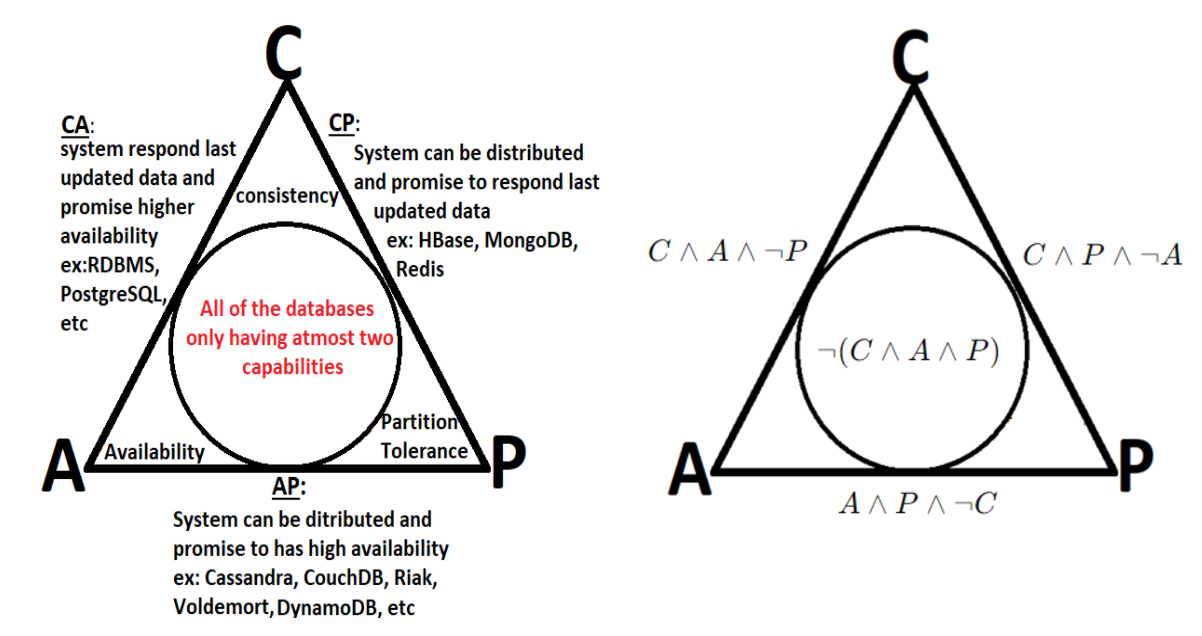
-
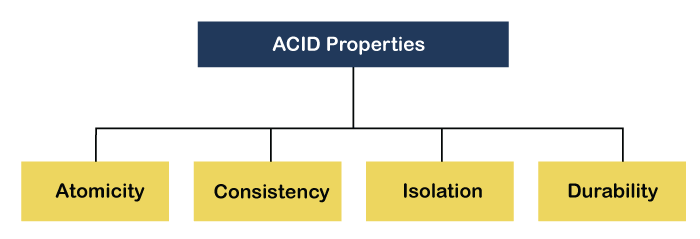
The ACID theorem refers to a set of properties that ensure reliable transaction processing in databases. These properties guarantee that database transactions are processed accurately, even in the presence of errors, power failures, or other disruptions. ACID stands for:
-
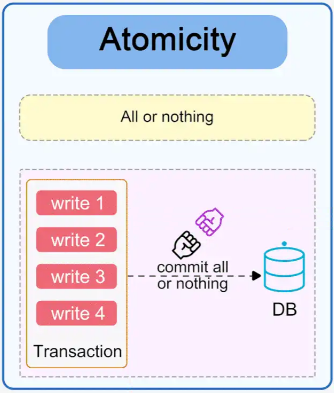
A transaction is treated as a single, indivisible unit. Either all its operations are completed successfully, or none are applied.
If any part of a transaction fails, the database remains unchanged, as if the transaction never occurred.
Example:
In a bank transfer, if money is debited from one account but cannot be credited to another due to an error, the entire transaction is rolled back.
-
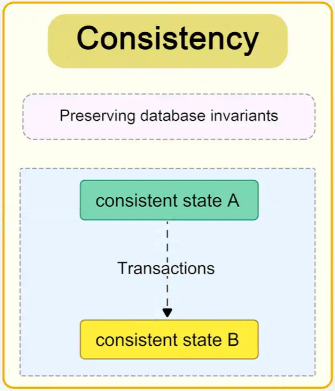
A transaction ensures that the database transitions from one valid state to another, maintaining all defined rules and constraints.
After a transaction completes, the database remains in a consistent state (e.g., constraints like unique keys, foreign keys, and checks are upheld).
Example:
In an inventory system, a transaction that decreases product stock cannot leave the stock in a negative state if the system enforces non-negative quantities.
-
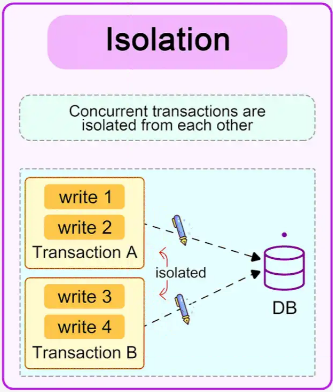
Transactions are executed independently and transparently. The operations of one transaction do not interfere with another.
Intermediate results of a transaction are not visible to other transactions until the transaction is committed.
Example:
Two customers cannot simultaneously purchase the last item in stock; the database ensures that one transaction completes before the other starts.
-
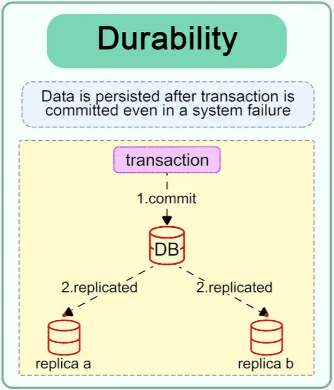
Once a transaction is committed, its results are permanent, even in the event of a system failure.
Changes made by a committed transaction are stored reliably (e.g., written to disk or replicated).
Example:
After confirming a flight booking, the reservation remains intact even if the server crashes immediately afterward.
-
-
-
-
-
-
Parallel data processing saves time, allowing the execution of applications in a shorter wall-clock time. Solve Larger Problems in a short point of time.
Compared to serial computing, parallel computing is much better suited for modeling, simulating and understanding complex, real-world phenomena.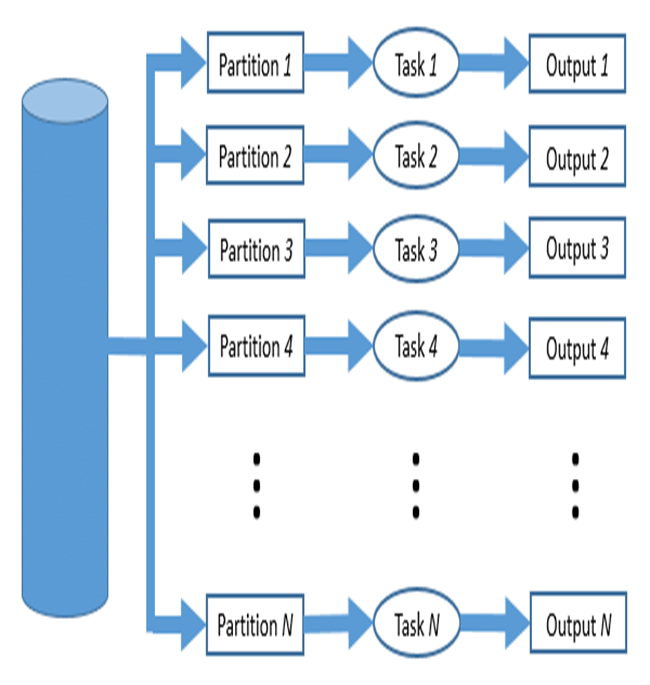
Parallel processing is a computing technique when multiple streams of calculations or data processing tasks co-occur through numerous central processing units (CPUs) working at the same time.
Parallel computing is becoming critical as more Internet of Things (IoT) sensors, and endpoints need real-time data. Given how easy it is to get processors and GPUs (graphics processing units) today through cloud services, parallel processing is a vital part of any micro service rollout.
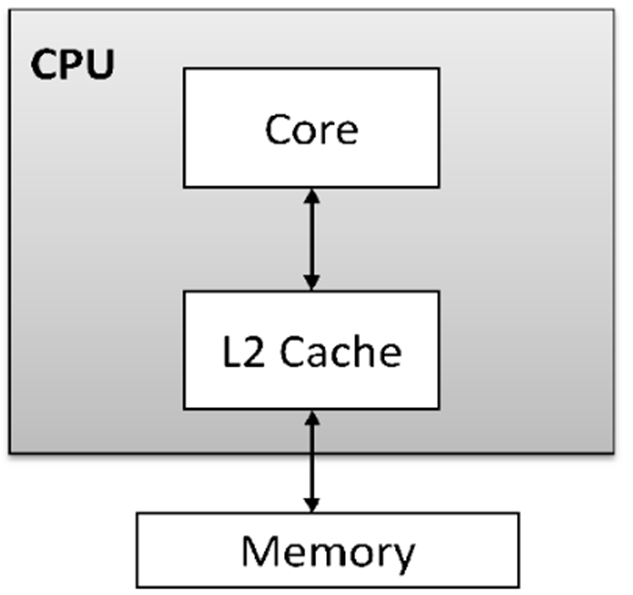
The concepts of processing are represented in the following types:1- A single-core processor is a type of CPU (Central Processing Unit) that has only one processing unit or core. It can execute one instruction or task at a time, meaning it processes instructions sequentially. While this type of processor can handle basic computing tasks effectively, it is less efficient than multi-core processors, which can handle multiple tasks simultaneously. Single-core processors were more common in early computers, but modern systems often use multi-core processors to improve performance and multitasking capabilities.
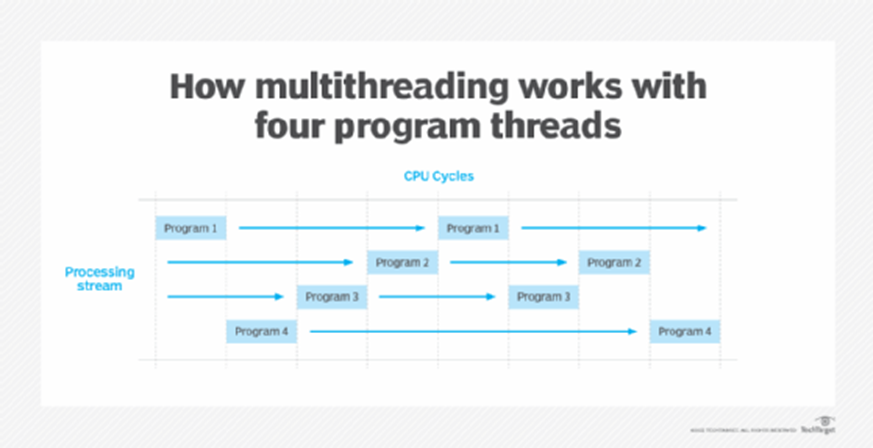
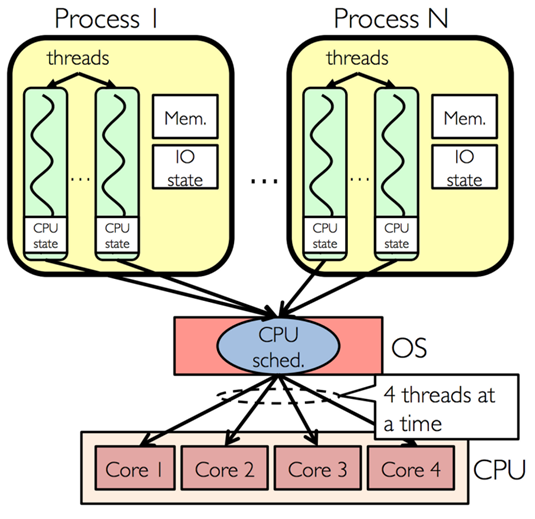
2- Multi-threading is a technique used in computing that allows a single process to be divided into multiple threads, which can be executed concurrently or in parallel. Each thread represents a separate unit of execution within a process, and they share the same memory space. The main advantage of multi-threading is that it enables better utilization of a system's CPU resources, allowing multiple tasks to be processed simultaneously.
3- A multi-core processor is a type of CPU that contains two or more independent processing units, called cores, within a single chip. Each core can execute instructions independently of the others, allowing the processor to handle multiple tasks simultaneously. This architecture improves performance, especially for tasks that can be parallelized.
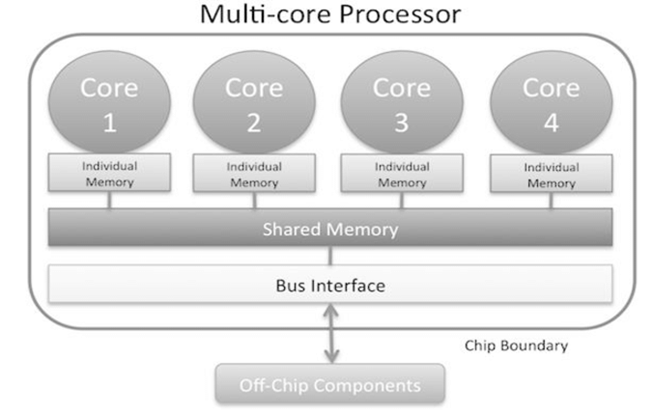
4- Multi-core with multi-threading refers to a system architecture that combines both multi-core processors and the ability to execute multiple threads per core. This combination allows for even more efficient parallel processing and multitasking, maximizing the performance of both hardware and software.
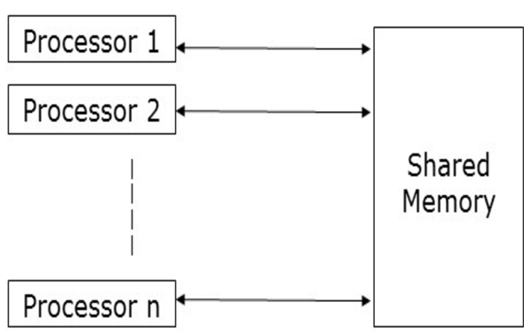
Shared memory refers to a memory architecture where multiple processing units (such as cores or nodes in a distributed system) can access a common memory space. This concept is particularly important in parallel processing systems, where large datasets need to be processed efficiently by multiple processors working in parallel.
Parallel processing is becoming critical as more Internet of Things (IoT) sensors, and endpoints need real-time data. Given how easy it is to get processors and GPUs (graphics processing units), today, through cloud services, parallel processing is an essential part of implementing any new microservice.
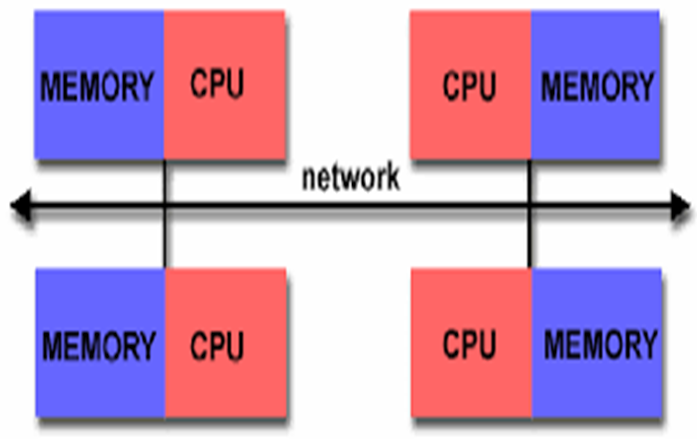
Distributed memory parallel computers use multiple processors, each with their own memory, connected over a network. Examples of distributed systems include cloud computing, distributed file systems, online multiplayer games, etc.
Hybrid memory parallel systems combine shared-memory parallel computers and distributed memory networks. Most “distributed memory” networks are actually hybrids. You may have thousands of desktops and laptops with multi-core processors all connected in a network and working on a massive problem.
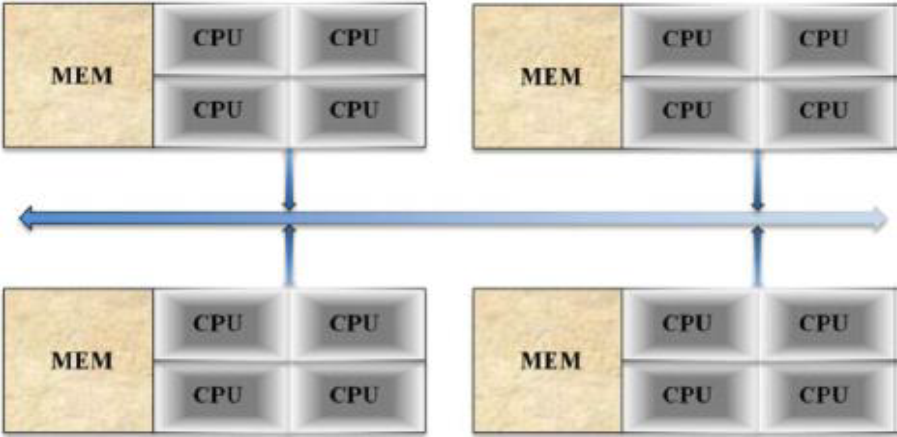
Followig are types of Parallel data processing:
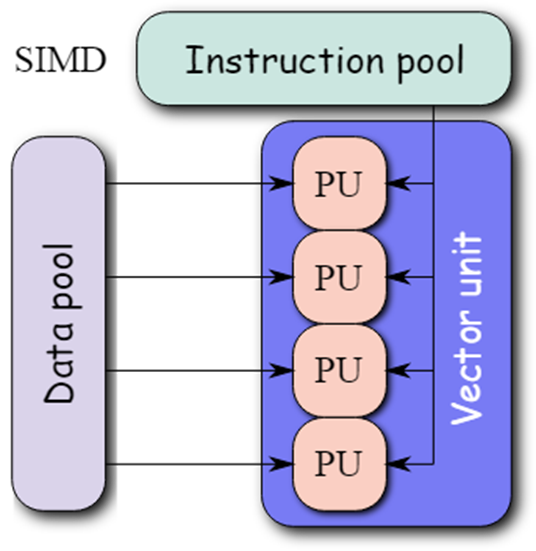
1- Single Instruction, Single Data (SISD): In SISD a single processor is responsible for simultaneously managing a single algorithm as a single data source. A computer organization having a control unit, a processing unit, and a memory unit is represented by SISD. It is similar to the current serial computer. Instructions are carried out sequentially by SISD, which may or may not be capable of parallel processing, depending on its configuration.
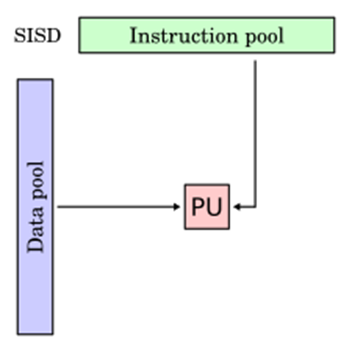
2- Multiple Instruction, Single Data (MISD) : Multiple processors are standard in computers that use the Multiple Instruction, Single Data (MISD) instruction set. While using several algorithms, all processors share the same input data. MISD computers can simultaneously perform many operations on the same batch of data. As expected, the number of operations is impacted by the number of processors available.
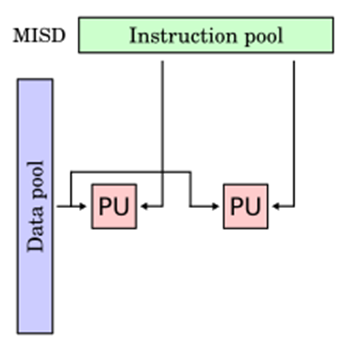
3- Single Instruction, Multiple Data (SIMD): Computers that use the Single Instruction, Multiple Data (SIMD) architecture have multiple processors that carry out identical instructions. However, each processor supplies the instructions with its unique collection of data. SIMD computers apply the same algorithm to several data sets. The SIMD architecture has numerous processing components.
4- Multiple Instruction, Multiple Data (MIMD): Multiple Instruction, Multiple Data, or MIMD, computers are characterized by the presence of multiple processors, each capable of independently accepting its instruction stream. These kinds of computers have many processors. Additionally, each CPU draws data from a different data stream. A MIMD computer is capable of running many tasks simultaneously.
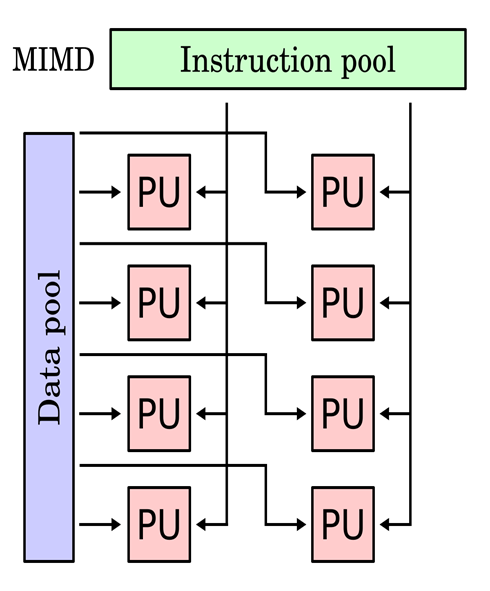
5- Single Program, Multiple Data (SPMD): SPMD systems, which stand for Single Program, Multiple Data, are a subset of MIMD. Although an SPMD computer is constructed similarly to a MIMD, each of its processors is responsible for carrying out the same instructions. SPMD is a message passing programming used in distributed memory computer systems. A group of separate computers, collectively called nodes, make up a distributed memory computer.
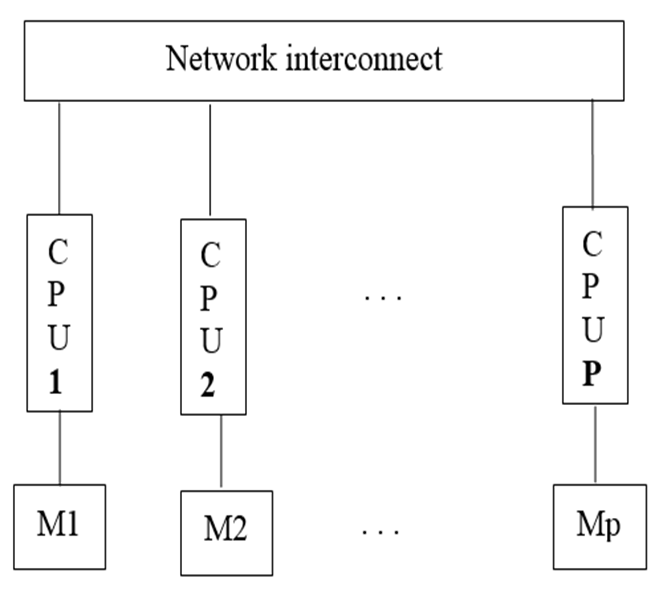
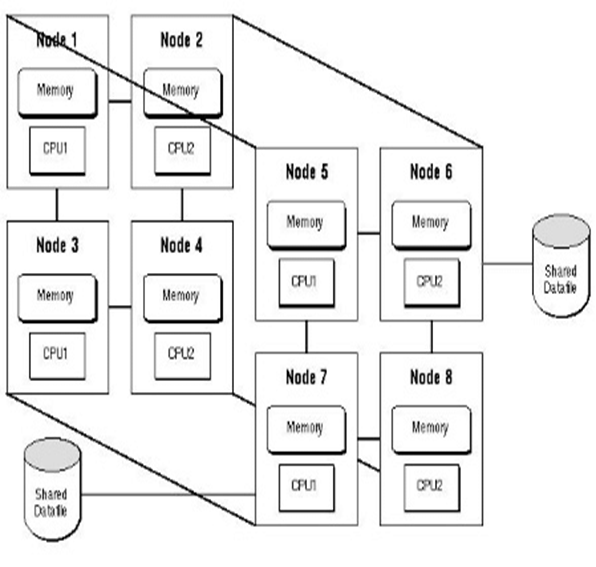
6- Massively Parallel Processing (MPP): A storage structure called Massively Parallel Processing (MPP) is made to manage the coordinated execution of program operations by numerous processors. With each CPU using its operating system and memory, this coordinated processing can be pplied to different program sections.
-
-
-
-
-
What It Means
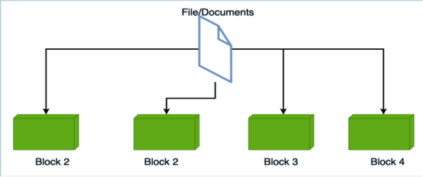
Instead of processing all data on a single computer, the work is divided among several machines (called nodes) connected in a network. Each node processes its part of the data and sends the results back to a central system or combines them for the final output.
Why It's Useful
-
Speeds up processing for large datasets.
-
Handles more data than a single machine can manage.
-
Improves fault tolerance: if one machine fails, others can continue working.
-
-
-
-
-
-
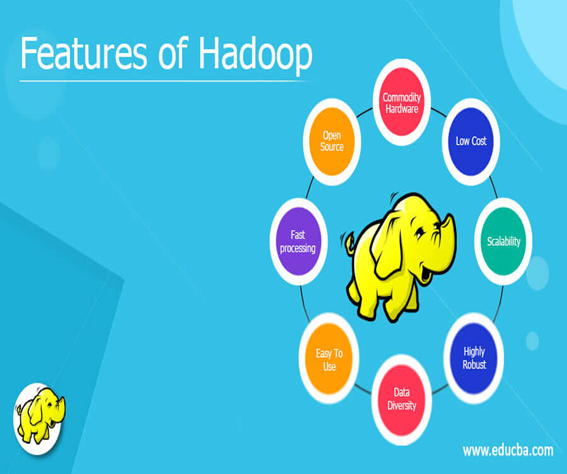
Hadoop is an open source software framework for storage and processing large scale of datasets on clusters of hardware.
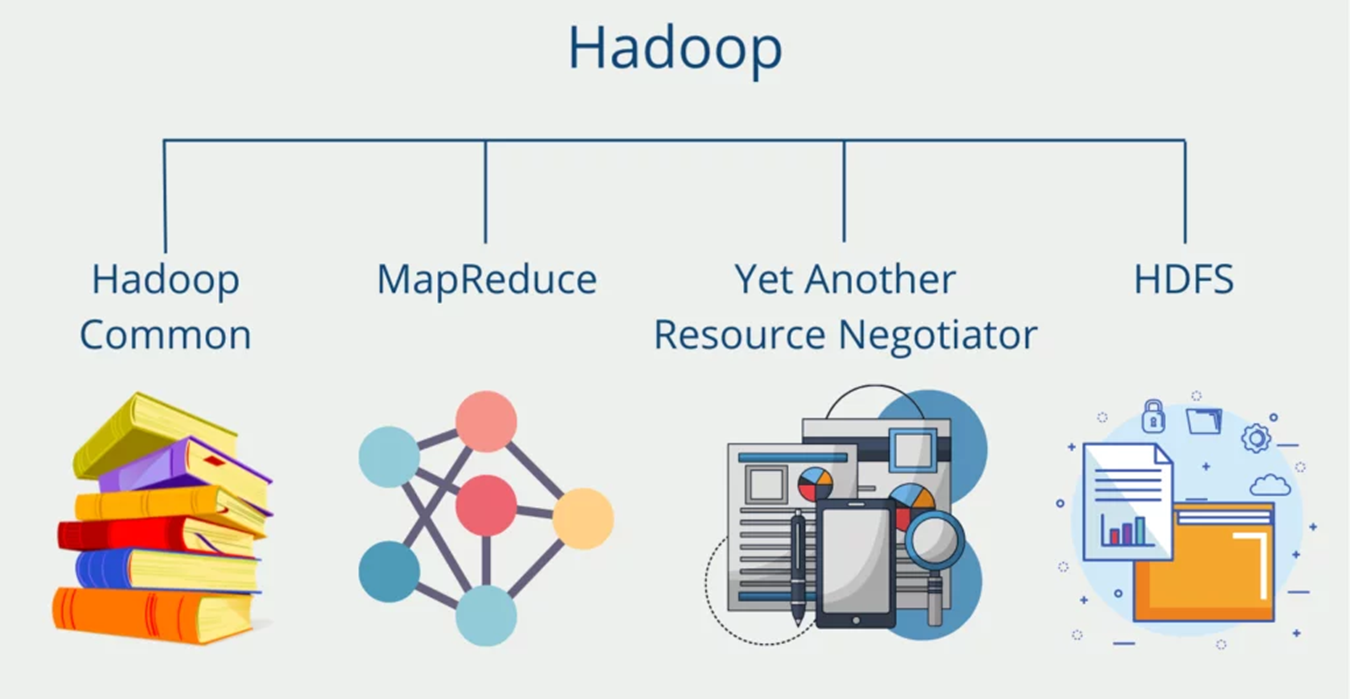
Hadoop provides a reliable shared storage and analysis system, here storage provided by HDFS and analysis provided by MapReduce.
1- HADOOP DISTRIBUTED FILE SYSTEM (HDFS):
The Hadoop Distributed File System (HDFS) is a distributed file system designed to run on hardware.
It has many similarities with existing distributed file systems.
HDFS is highly fault-tolerant and is designed to be deployed on low-cost hardware.
HDFS provides high throughput access to application data and is suitable for applications that have large data sets.
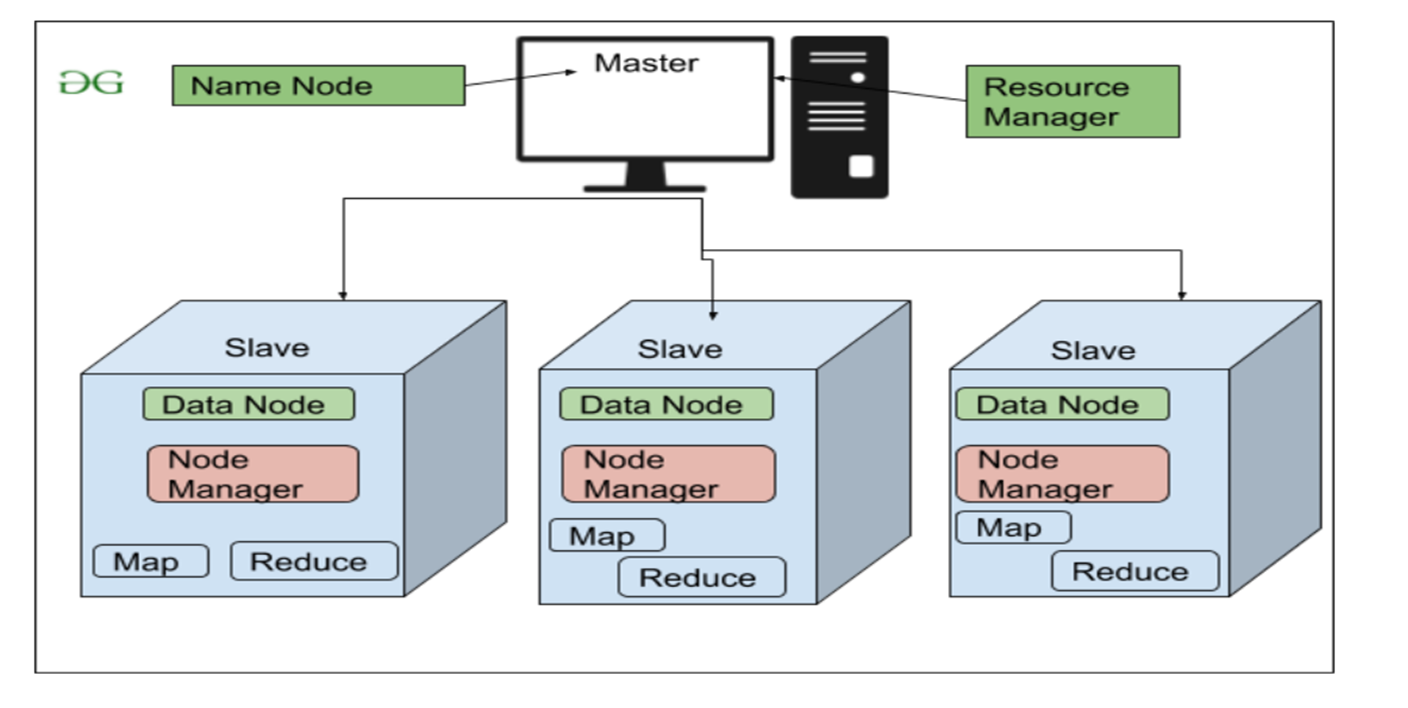
NameNode and DataNodes
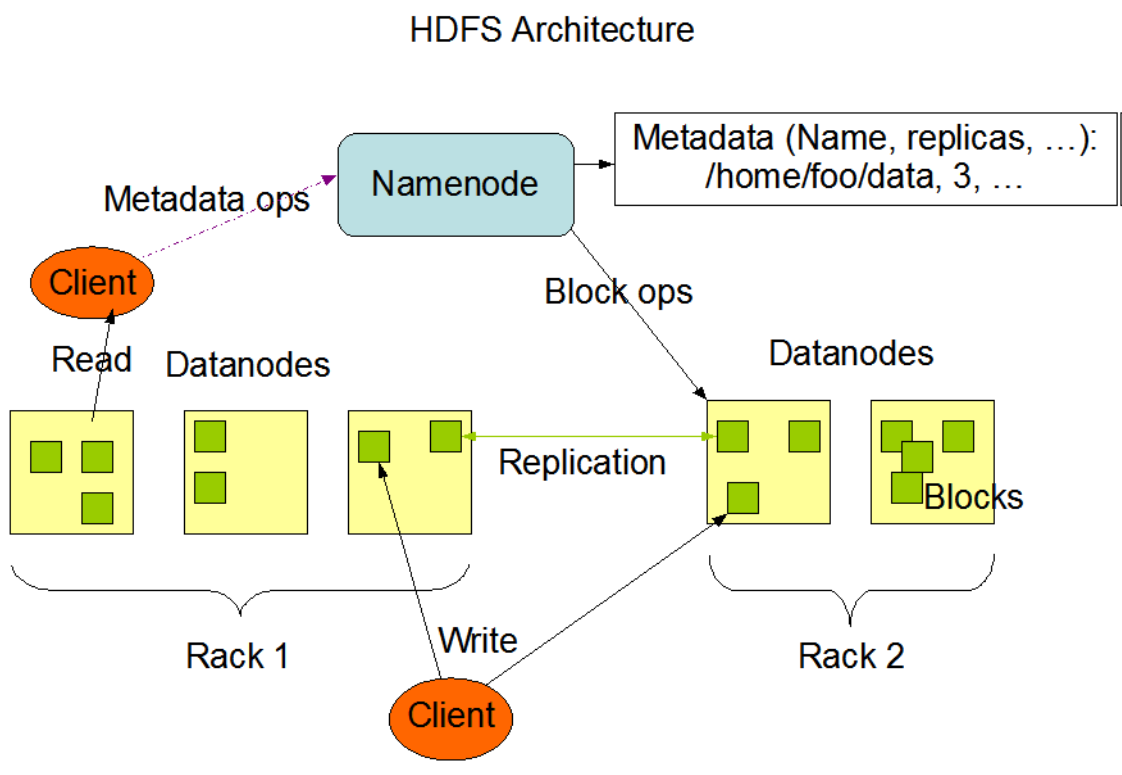
HDFS has a master/slave architecture. An HDFS cluster consists of a single NameNode, a master server that manages the file system name space and regulates access to files by clients. In addition, there are a number of DataNodes, usually one per node in the cluster, which manage storage attached to the nodes that they run on. HDFS exposes a file system namespace and allows user data to be stored in files. Internally, a file is split into one or more blocks and these blocks are stored in a set of DataNodes. The NameNode executes file system name space operations like opening, closing, and renaming files and directories. It also determines the mapping of blocks to DataNodes. TheDataNodes are responsible for serving read and write requests from the file system’s clients. The DataNodes also perform block creation,deletion, and replication upon instruction from the NameNode.
The NameNode and DataNode are pieces of software designed to run on commodity machines. These machines typically run a GNU/Linuxoperating system (OS). HDFS is built using the Java language; any machine that supports Java can run the NameNode or the DataNodesoftware. Usage of the highly portable Java language means that HDFS can be deployed on a wide range of machines. A typical deployment hasa dedicated machine that runs only the NameNode software. Each of the other machines in the cluster runs one instance of the DataNodesoftware. The architecture does not preclude running multiple DataNodes on the same machine but in a real deployment that is rarely the case.
The existence of a single NameNode in a cluster greatly simplifies the architecture of the system. The NameNode is the arbitrator andrepository for all HDFS metadata. The system is designed in such a way that user data never flows through the NameNode.
The File System Namespace
HDFS supports a traditional hierarchical file organization. A user or an application can create directories and store files inside these directories.The file system namespace hierarchy is similar to most other existing file systems; one can create and remove files, move a file from onedirectory to another, or rename a file. HDFS supports user quotas and access permissions. HDFS does not support hard links or soft links.However, the HDFS architecture does not preclude implementing these features.
While HDFS follows naming convention of the FileSystem, some paths and names (e.g. /.reserved and .snapshot ) are reserved. Features suchas transparent encryption and snapshot use reserved paths.
The NameNode maintains the file system namespace. Any change to the file system namespace or its properties is recorded by the NameNode.An application can specify the number of replicas of a file that should be maintained by HDFS. The number of copies of a file is called thereplication factor of that file. This information is stored by the NameNode.
2- MapReduce:
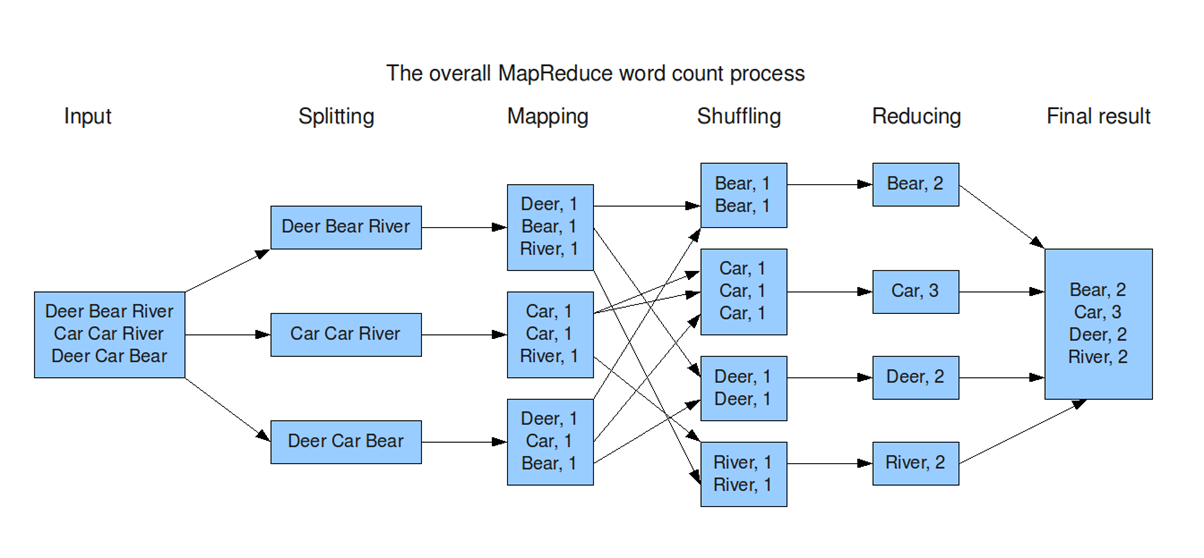
It origins from Google and helps to divide complex computing tasks into more manageable subprocesses and then distributes these across several systems, i.e. scale them horizontally. This significantly reduces computing time. In the end, the results of the subtasks have to be combined again into the overall result.
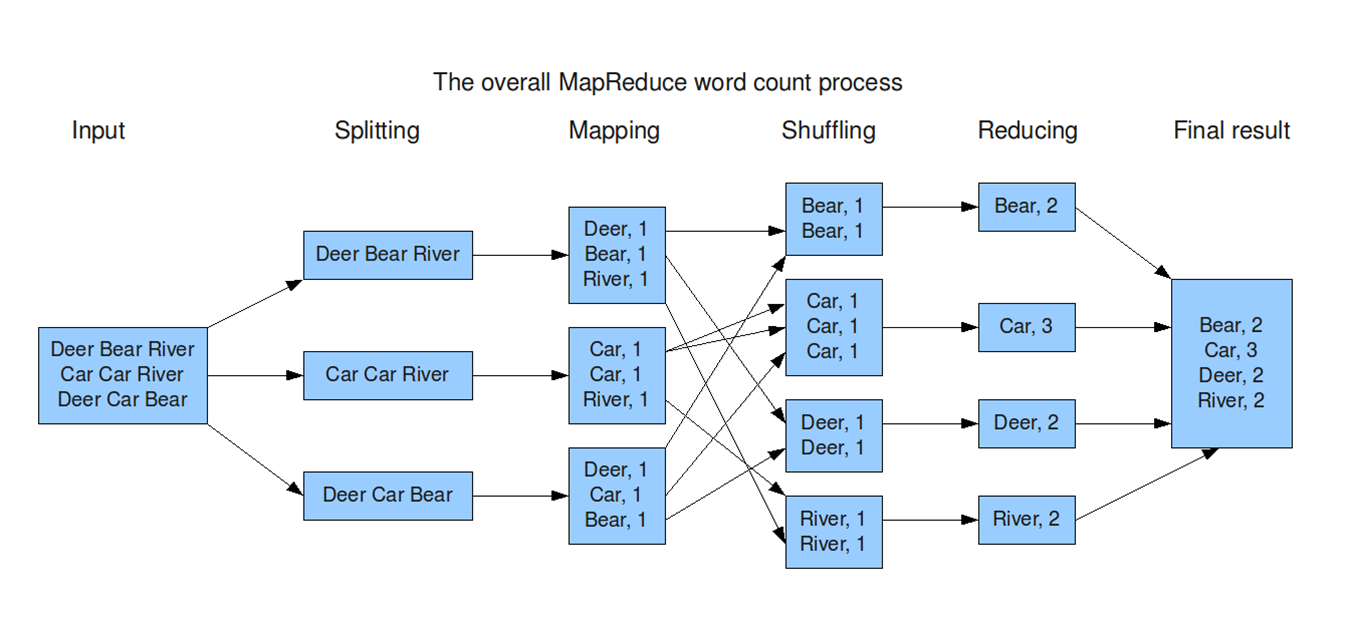
Input:The system takes a large dataset (e.g., a file or database) as input for processing.
Splitting:The dataset is divided into smaller chunks (splits) to be processed in parallel across multiple nodes.
Mapping:Each chunk is processed to generate key-value pairs, where the key organizes the data, and the value provides relevant information.
Shuffling:Key-value pairs are redistributed across nodes so that all pairs with the same key are sent to the same node. This step ensures data is grouped logically for the next stage.
Reducing:Each reducer processes the grouped data (by key), performing operations like summing, counting, or aggregating to generate a result.
Final Result:The reduced outputs from all nodes are combined into the final output dataset, ready for use or analysis.
-
Map: Mappers in containers execute the task using the data block in slave nodes. This is a part of the actual data manipulation for the job requested by the client. All mappers in the containers execute the tasks in parallel. The performance of the mapper depends on scheduling, data locality, programmer skills, container’s resources, data size and data complexity.
-
Sort/Spill: The output pair which is emitted by the mapper is called partition. The partition is stored and sorted in the key/value buffer in the memory to process the batch job. The size of the buffer is configured by resource tracker and when its limit is reached, the spill is started
-
Shuffle: The key/value pairs in the spilled partition are sent to the reduce nodes based on the key via the network in this step. To increase the network performance.
-
Merge: The partitions in the partition set are merged to finish the job. This step has usually been studied along with the shuffle step, such as in-memory with compression.
-
Reduce: The slave nodes process the merged partition set to make a result of the application. The performance of reduce depends on scheduling, locality, programmer skills, container resources, data size, and data complexity, as was the case in the map step. However, unlike in the map step, the reduce step can be improved by in-memory computing.
-
Output: The output of reduce nodes is stored at HDFS on the slave nodes.
3- Hadoop YARN
YARN (Yet Another Resource Negotiator) is a core component of Hadoop. Its main job is to manage resources and coordinate the execution of applications across the system. It ensures that all programs get the CPU and memory they need without conflicts.
Roles in Hadoop
-
Resource Management: Example: In MapReduce, the appropriate nodes are identified while ensuring balance in the system.
-
Application Execution: Example: Running a MapReduce program and monitoring it until it finishes.
-
Fault Tolerance: Example: YARN monitors nodes and restarts failed tasks.
4- Hadoop Common:
Hadoop Common is the foundation of the Hadoop ecosystem. It provides the essential tools, libraries, and utilities required by other Hadoop components (like HDFS and MapReduce) to function properly.
Key Roles
-
Provides Shared Libraries: Example: Libraries for file handling, logging, or network communication.
-
Manages Configuration: Example: Setting the block size in HDFS or specifying the replication factor.
-
Enables Communication Between Components: Example: Ensuring that a MapReduce job can access data stored in HDFS.
-
Provides Utility Tools: Example: Decompressing large files before processing them.
-
-
-
-
-
-
A workload represents the amount of computational power or resources required for a specific task, such as the processing power, memory, storage, or network capacity needed to run applications or processes. It can also refer to the distribution of tasks across multiple systems, especially in cloud computing or distributed environments.
-
The Round-Robin (RR) algorithm is a simple and widely used scheduling technique in computer systems. It allocates resources or executes processes in a cyclic order, ensuring that each task gets an equal and fair share of the resource for a specific time slice, called a quantum (or time slice).
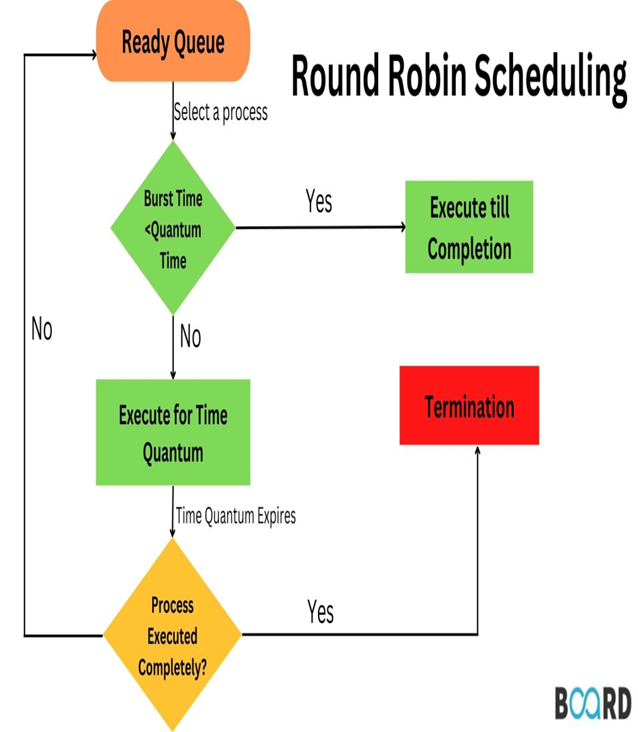
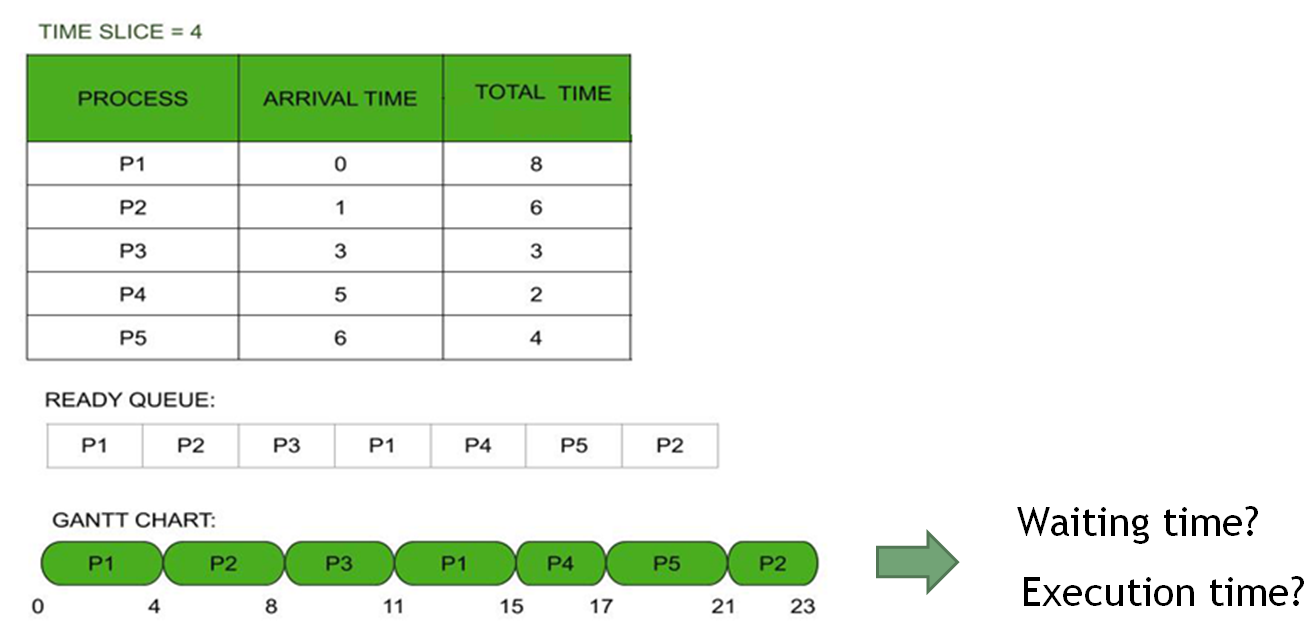
Uses of RR in reality
-
CPU Scheduling: Time-sharing systems to distribute CPU time among processes.
-
Network Packet Scheduling: Handling data packets in routers.
-
Resource Allocation in Virtualized Environments: Allocating CPU or network resources among virtual machines.
-
Advantages
-
Fair Resource Allocation: All processes are treated equally.
-
Simplicity: Easy to implement and understand.
-
Prevents Starvation: Each process gets a chance to execute.
Disadvantages
-
Context Switching Overhead:Frequent process switches require the system to save and load the state of each process, which uses extra time and resources, reducing efficiency.
-
Performance Dependent on Quantum:
-
If the quantum is too small, overhead increases.
-
If the quantum is too large, response time for short tasks may increase.
Max-Min Fairness is a resource allocation principle used to ensure a fair distribution of resources among users or processes. It aims to maximize the allocation for the process or user with the minimum resource share, thereby promoting equity while avoiding resource starvation.
Applications
-
Network Bandwidth Allocation: Distributing network bandwidth among multiple users or devices.
-
CPU Scheduling: Allocating processor time among competing processes.
-
Cloud Computing: Fairly distributing computational or storage resources among tenants.
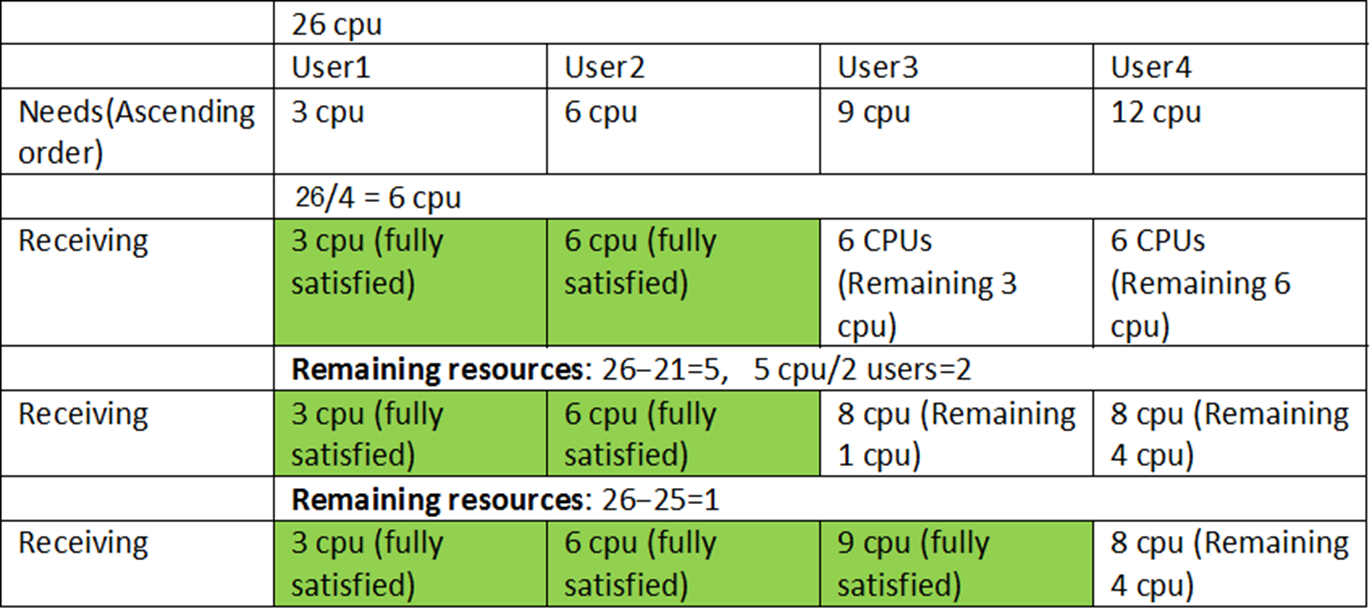
-
-
-
-
-
-
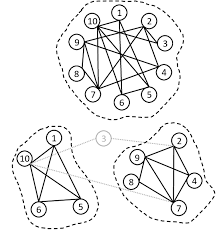
A cluster is a group of computers (called nodes or servers) that work together like one big system.
-
Each node is a separate computer with its own CPU, memory, and storage.
-
All the nodes are connected by a network so they can share tasks and data.
-
If one node fails, the others can keep the system running.
-
Clusters are used to handle big workloads, store large amounts of data, and keep services running without interruption.
-
-
-
-
-
-
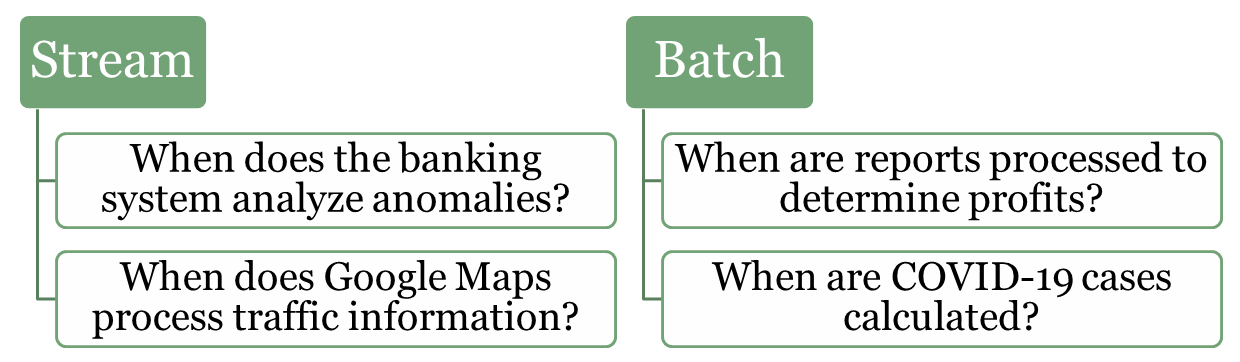
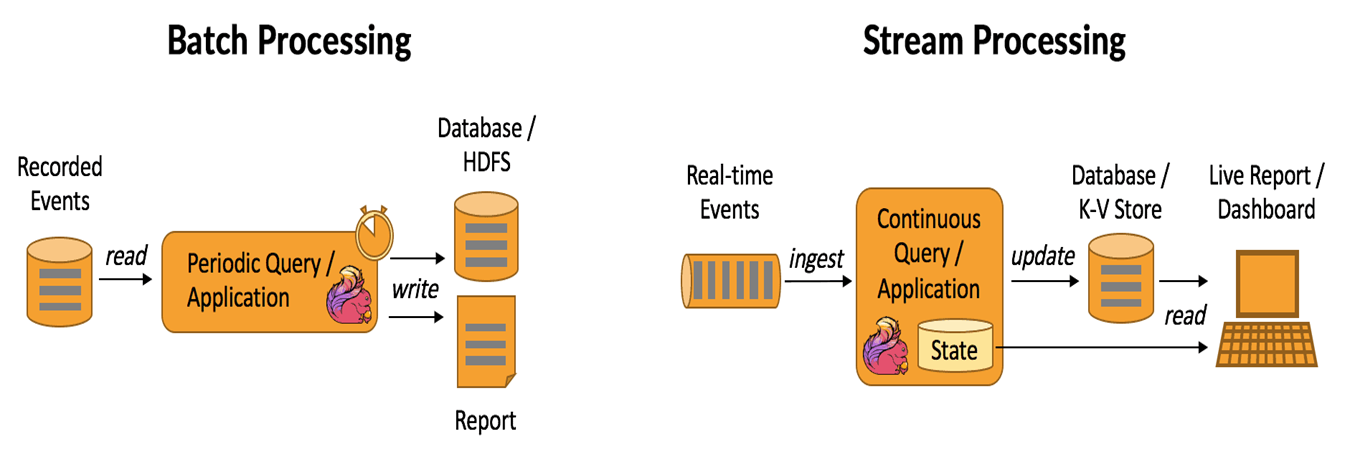
In data processing, stream processing and batch processing represent two fundamental approaches to handling and analyzing data. Both methods are essential for modern systems, but they are tailored for different scenarios and types of workloads. Understanding their differences and use cases is crucial for designing efficient and scalable systems.
-
-
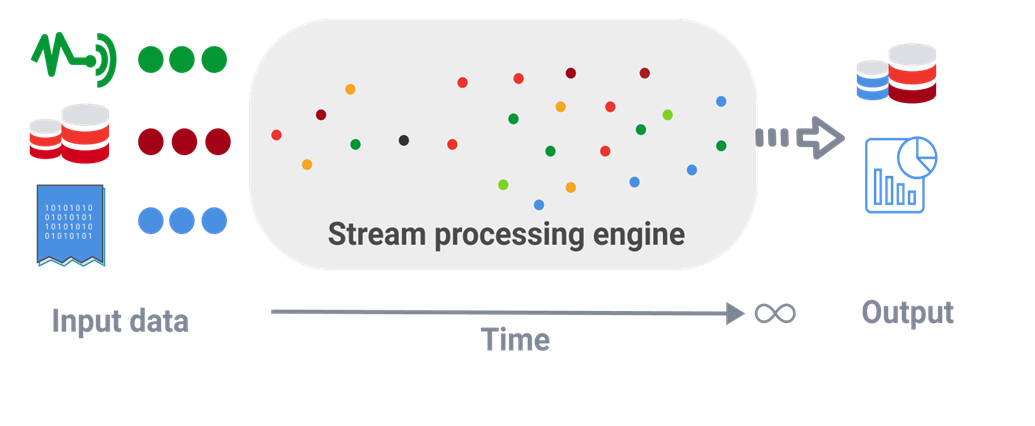
Stream (real-time) processing is a method of continuously analyzing and processing data as it is generated in real-time. Instead of waiting for all the data to be collected, it processes data events one by one or in small batches, making it ideal for scenarios that require immediate insights or actions.
Examples:
-
Fraud Detection in Banking: Identifying unusual patterns in transactions, such as large withdrawals or suspicious account activities, as they occur.
-
Traffic Monitoring (e.g., Google Maps): Analyzing live traffic data from sensors and user devices to provide real-time updates and suggest alternative routes.
-
IoT Systems: Monitoring and reacting to sensor data in smart homes or factories, such as turning off a machine if overheating is detected.
-
Healthcare: Real-time surveillance sends immediate alerts for critical patient conditions
-
-
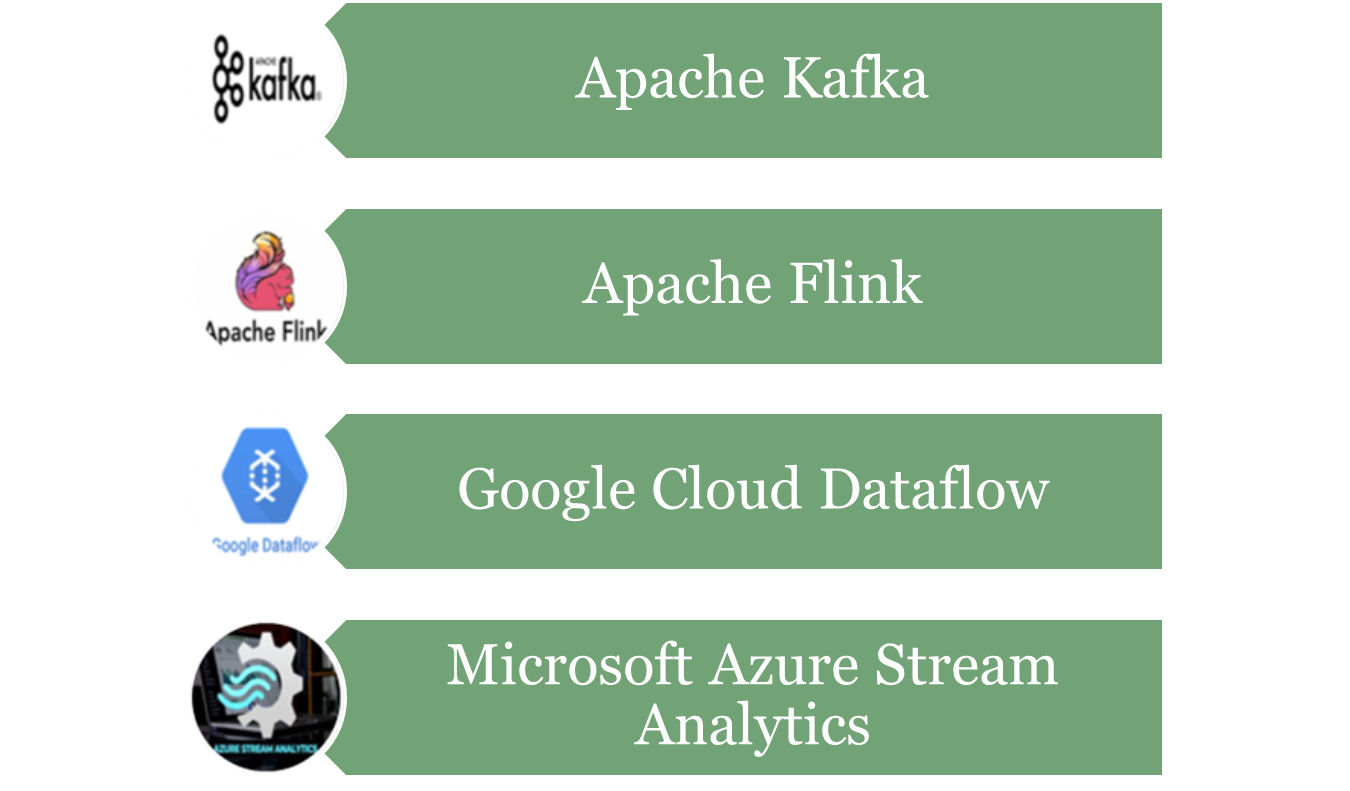
Kafka
-
Apache Kafka is an open-source distributed event streaming platform used to handle high-throughput, low-latency, real-time data streams. It is designed to handle large volumes of data efficiently and allows systems to publish, subscribe, store, and process streams of records (events or messages) in a fault-tolerant manner.
-
Kafka is often used for building real-time data pipelines, streaming analytics, and event-driven architectures. It can handle a variety of use cases, such as log aggregation, real-time analytics, data replication, and more.
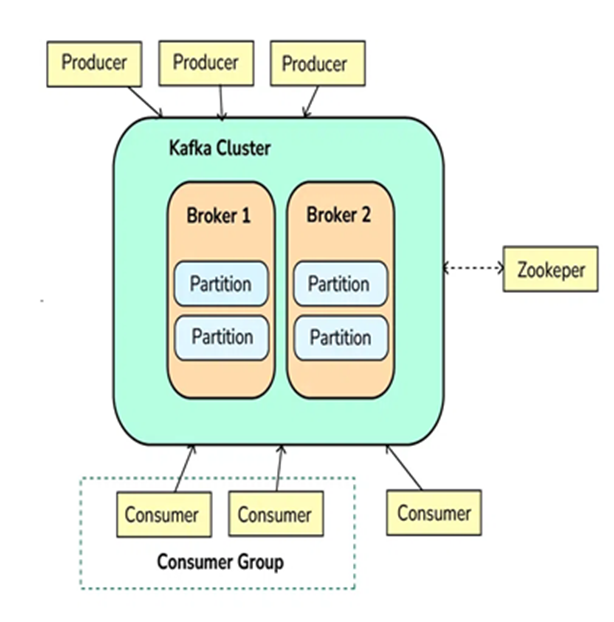
Step 1: Producers Send Messages (Events)
-
Producers are applications or services that send data (events/messages) to Kafka.
-
Producers push data into topics in Kafka, which are logical channels to organize messages. A producer can publish messages to one or more topics.
Step 2: Kafka Brokers Store Messages
-
Kafka brokers are the servers that receive, store, and manage messages.
-
Kafka topics are divided into partitions, which are distributed across different brokers to ensure scalability and fault tolerance.
-
Each partition stores messages in a sequential order, and messages within a partition are given an offset, which is a unique identifier.
Step 3: Kafka Consumers Read Messages
-
Consumers subscribe to topics or specific partitions to consume the messages.
-
Consumers read the messages in the order they were written (based on the offset). A consumer can either read from the latest message or from an earlier offset to reprocess the data.
-
Kafka allows multiple consumers to work in parallel, scaling horizontally.
Step 4: Kafka Zookeeper Coordinates Kafka Cluster
-
Kafka uses Zookeeper (or KRaft mode in newer versions) to manage and coordinate the Kafka cluster.
-
Zookeeper helps track the metadata of topics, partitions, and offsets, and ensures high availability and fault tolerance of Kafka brokers.
Step 5: Kafka Handles Fault Tolerance and Replication
-
Kafka provides replication to ensure that the data is not lost. Each partition of a topic has multiple replicas stored on different brokers.
-
If a broker fails, Kafka will automatically recover and continue functioning by redirecting to replicas, ensuring data durability and fault tolerance.
Step 6: Kafka Provides Real-Time Processing
-
Kafka is commonly integrated with stream processing frameworks like Kafka Streams or external systems like Apache Flink or Apache Spark for real-time data processing.
-
The system processes data in real-time, allowing for quick insights and reactions to incoming data.
-
-
-
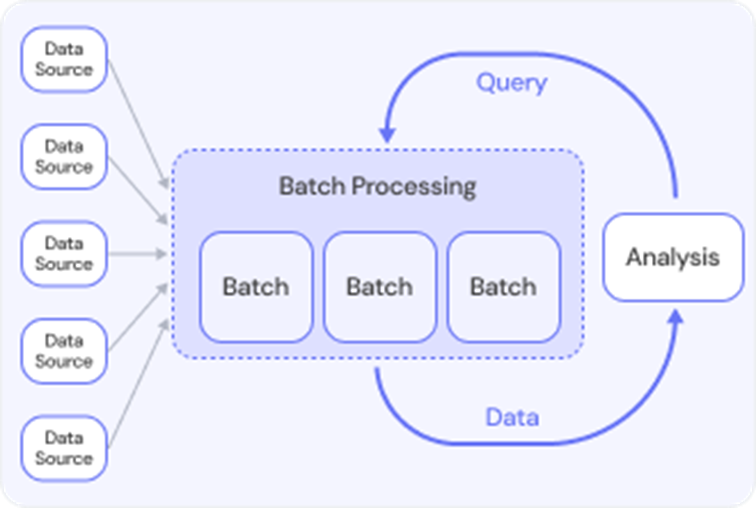
Batch processing refers to the execution of a series of data processing tasks in a group or "batch," rather than processing data in real-time. In batch processing, data is collected over a period of time, stored, and then processed all at once. This method is typically used for tasks that do not require immediate feedback or action, and the processing is done at scheduled intervals (e.g., daily, weekly, or monthly).
-
Batch processing is often used when dealing with large volumes of data, where real-time processing isn't necessary, and the system can offer a delay in getting results.
Exampels:
-
Lab Test Results: When patients receive multiple lab tests, results may be processed in batches at regular intervals. Instead of notifying patients individually as results come in, the system sends batch notifications to patients when all their test results are ready.
-
Payroll Processing: A company has to pay employees every month. Instead of calculating and paying each employee individually, the payroll department processes all employee salaries in a batch, usually at the end of the month.
-
Social Media Post Scheduling: A social media manager schedules posts for a week. Instead of posting content in real time, they prepare and schedule all posts in a batch at once, to be published at specific times.
-
Telecommunications Billing: A telecom company processes call data for its users. Instead of processing each call immediately, the system batches all calls and processes them in bulk for billing at the end of the month.
-
-
-
-
-
-
-
-
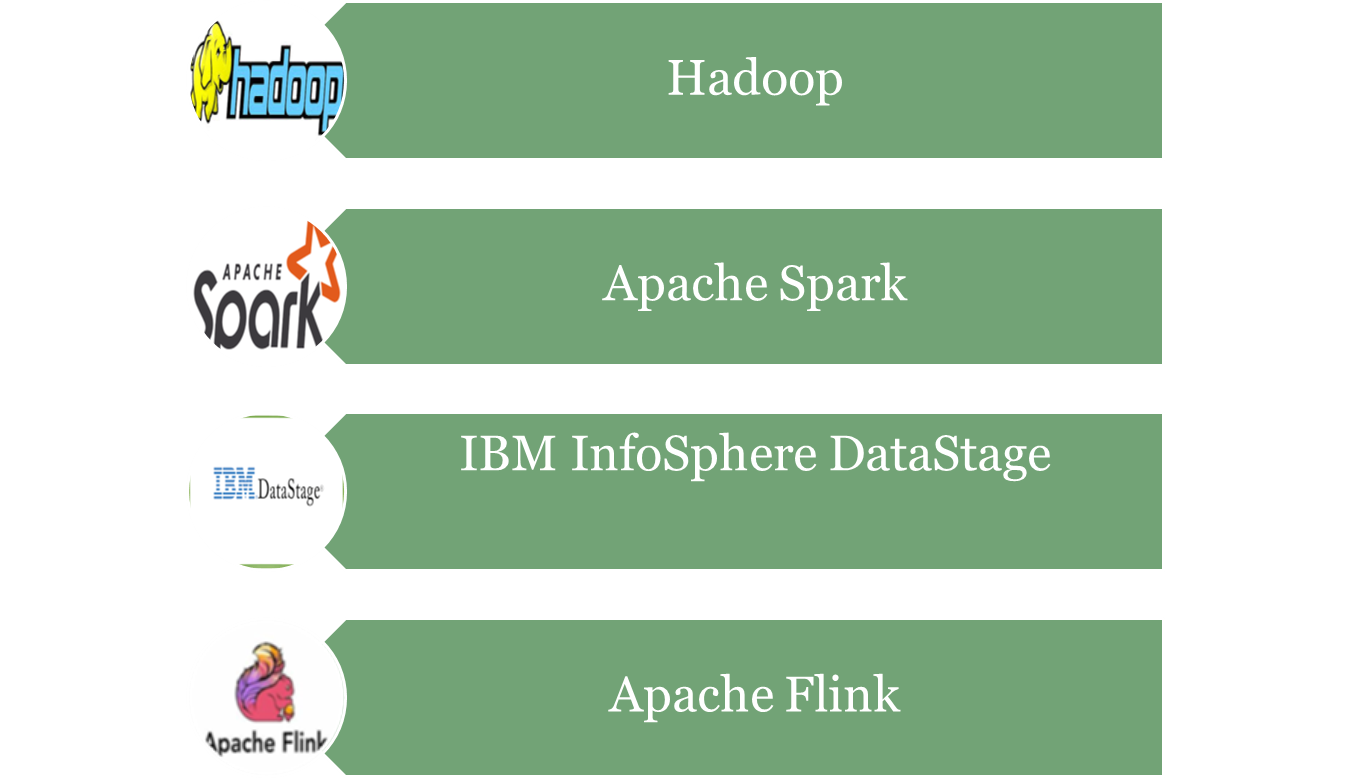
Apache Flink is an open-source framework and distributed processing engine designed for working with large-scale data. It is especially powerful because it can handle both real-time (stream) processing and batch processing in the same system.
Flink processes data across many connected computers (a cluster), allowing it to work with massive amounts of information at very high speed. In stream processing mode, it can process events the moment they arrive—making it useful for applications like fraud detection, live analytics, and monitoring systems. In batch mode, it can handle large stored datasets for analysis or transformation.
It also offers features like fault tolerance (recovery if something fails), scalability (adding more machines to handle more data), and support for complex event processing. Flink is widely used in industries that need fast, reliable, and scalable data handling.

Apache Spark is an open-source big data processing engine designed to handle very large datasets quickly and efficiently. It can work in both batch processing (handling stored data in bulk) and stream processing (handling data in real time).
Spark runs on a cluster of computers, dividing the work among multiple nodes so tasks finish much faster than on a single machine. One of its main strengths is in-memory processing, meaning it keeps data in RAM instead of reading it from disk each time, which makes it much faster than older systems like Hadoop MapReduce.
It supports many tasks such as data analysis, machine learning, graph processing, and streaming. Spark can work with data from many sources like Hadoop Distributed File System (HDFS), NoSQL databases, or cloud storage. Because it’s flexible, scalable, and fast, Spark is used in industries for real-time analytics, recommendation systems, large-scale data transformation, and scientific research.

Apache Hive is an open-source data warehouse system built on top of Hadoop. It is designed to make working with large datasets easier by allowing users to write queries in a language similar to SQL, called HiveQL, instead of writing complex MapReduce programs.
Hive translates these SQL-like queries into MapReduce, Spark, or Tez jobs that run on a Hadoop cluster, so it can process massive amounts of data stored in the Hadoop Distributed File System (HDFS) or compatible storage systems.
It is mainly used for batch processing—analyzing and summarizing historical data rather than real-time data. Hive is popular for tasks like data summarization, reporting, and business intelligence because it’s easier for people familiar with SQL to use.
In short, Hive acts as a bridge between SQL users and the Hadoop ecosystem, making big data querying more accessible.

Apache HBase is an open-source, non-relational (NoSQL) database that runs on top of the Hadoop Distributed File System (HDFS). It is designed to store and manage very large amounts of data—billions of rows and millions of columns—across many machines in a cluster.
Unlike traditional relational databases, HBase stores data in a column-oriented way, which makes it faster for certain types of big data operations. It is especially good for handling sparse data (where many fields might be empty) and for scenarios that require quick read and write access to large datasets.
HBase is often used for real-time data access on top of Hadoop, such as storing user profiles, time-series data, or logs that need fast lookup and updates. It also integrates with tools like Hive, Spark, and Pig for analytics.
In short, HBase provides real-time, scalable, and fault-tolerant storage for massive datasets in the Hadoop ecosystem.

Apache Storm is an open-source, real-time stream processing system. It is designed to process data as soon as it arrives, making it useful for applications that need instant analysis and action.
Storm works on a cluster of computers, where incoming data streams are split into smaller tasks and processed in parallel across different nodes. Unlike batch systems (which handle stored data in bulk), Storm focuses on continuous, never-ending data flows—like tweets, sensor readings, stock market updates, or server logs.
It is fast (processing millions of messages per second), scalable (can handle more data by adding more machines), and fault-tolerant (can recover from failures without losing data).
In short, Apache Storm is ideal for real-time analytics, monitoring systems, live dashboards, and event-driven applications.

Elasticsearch is an open-source search and analytics engine designed to store, search, and analyze large volumes of data very quickly. It is often used when you need to find information fast—even in datasets containing millions or billions of records.
It stores data in a JSON document format and indexes it so that searches are extremely fast. This makes it great for full-text search (like searching words in documents), as well as filtering and aggregating structured data.
Elasticsearch works in a cluster of servers, meaning it can handle huge datasets by splitting the data across multiple nodes. It is also fault-tolerant and scalable, so you can add more servers to handle more data or more users.
It’s commonly used for:
-
Log analysis (often with Logstash and Kibana in the ELK stack)
-
Real-time search on websites or apps
-
Data monitoring and visualization
In short, Elasticsearch is like a super-fast, scalable search engine for both text and structured data.

Talend is an open-source data integration and management tool that helps collect, clean, transform, and move data between different systems. It is used to make sure data from different sources can work together in one place.
With Talend, you can connect to many types of data sources—databases, cloud storage, applications, APIs, big data systems—and create data pipelines that automatically process and transfer the data. It has a visual interface, so instead of writing all the code yourself, you can build workflows by dragging and dropping components.
Talend is useful for:
-
Data integration – combining data from different systems.
-
ETL (Extract, Transform, Load) – taking data from a source, changing it to fit your needs, and loading it into a target system.
-
Big data processing – working with tools like Hadoop, Spark, or cloud data warehouses.
-
Data quality – detecting and fixing errors in the data.
In short, Talend is a data workflow tool that makes it easier to prepare and move data where it’s needed, in the right format and quality.
MongoDB is an open-source, NoSQL database designed to store and manage large amounts of data in a flexible way. Unlike traditional databases that use tables and rows, MongoDB stores data as documents in a format similar to JSON (key–value pairs).
This flexibility means each document can have its own structure—perfect for handling unstructured or semi-structured data like logs, user profiles, product catalogs, or sensor data. You can also change the data structure easily without redesigning the whole database.
MongoDB is:
-
Scalable – can store data across many servers in a cluster.
-
Fast – optimized for quick reads and writes.
-
Flexible – no fixed schema, so data can evolve over time.
-
Geared for modern apps – integrates well with web, mobile, and IoT applications.
It’s often used for real-time analytics, content management, e-commerce platforms, and applications that deal with rapidly changing data.
In short, MongoDB is a flexible, document-based database that makes storing and retrieving big, varied datasets easy and fast.

-
-